

Hello contrarians,
Today’s idea is called The Classroom Cut Club.
Find a comfy chair. 🪑
First, a guidebook writer’s story. Then, the business you could build from it.
⠀
⚡ Quick facts
⠀
📖 How a guidebook writer turned a $33 craft blog into six figures a month
Her craft blog started as a hobby, and paid like one.
For nearly 20 years, Jennifer Marx ran PassPorter, a company that published Disney travel guides.
So, travel guides.
Not crafts.
⠀
But she had crafted all her life.
Her mother, an artist and crafter, had her making things from a very young age.
⠀
So she started a craft blog as a part-time hobby, and it earned $33 a month.
She called it JenniferMaker.
$33 a month isn’t enough to live on.
⠀
Then the blog “exploded,” she wrote, and took more and more of her time.
So in 2017, she quit splitting her time and went all in on JenniferMaker.
⠀
Her big topic? Cricut projects.
She showed crafters what to make with the machine, step by step.
⠀
Here’s how she grew: one source of website visitors at a time.
Pinterest first, then Facebook, then YouTube.
⠀
Her Facebook group reached about 115,000 members by early 2020.
⠀About a year after she started on YouTube, she had more than 225,000 subscribers.
⠀In 2019, she earned about $70,000 a month, a German business site reported.
Most of it came from online courses on crafting with Cricut machines.
⠀
And in April 2020, a podcast host said she brings in “more than 6-figures every month.”
Six figures a month means at least $100,000 a month.
Wowza. 🤩
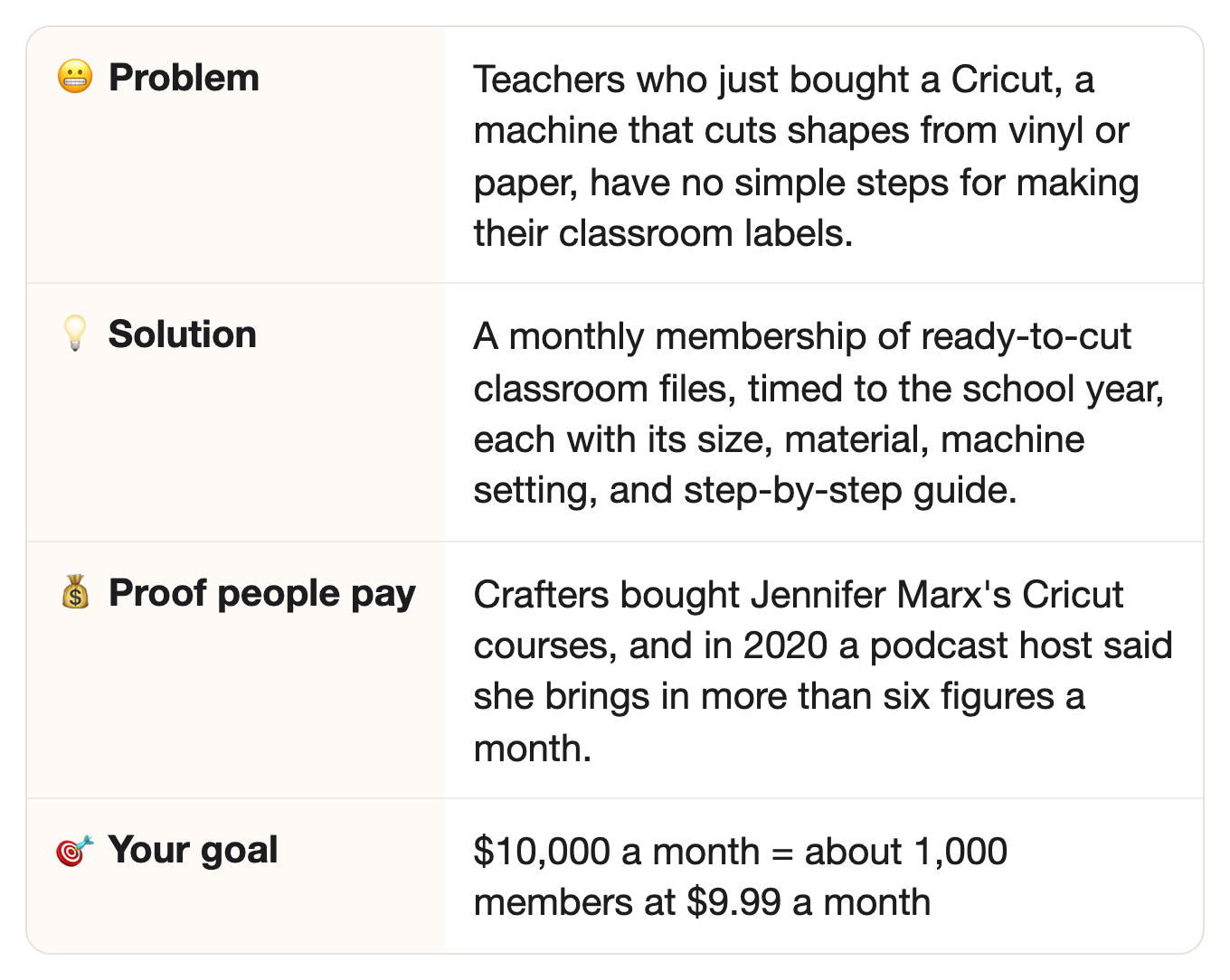
She went from a $33-a-month hobby blog to six figures a month, by showing Cricut owners what to make and how.
⠀
🔗 Same idea, new group
In the story: crafters of every kind paid Jennifer Marx to learn what to make with their Cricut, step by step.
⠀In this idea: teachers who own a Cricut need the same step-by-step help, for the labels and signs each school month brings.
⠀Why it carries over: both groups already own the machine, and the hard part is the right size, material, and setting for each project.
⠀
💡 The opportunity
Teachers make things for their classrooms all year, and they pay for it themselves.
First, who owns a Cricut?
A lot of people.
Cricut counted just under 5.9 million active users at the end of 2025.
⠀
Cricut itself goes after teachers.
It runs a program called Cricut Teachers, with discounts for teachers and school administrators.
Its blog posted back-to-school projects for teachers in August 2021 and again in August 2024.
⠀
And there are a lot of teachers.
The US had 3.8 million public school teachers in the 2020–21 school year.
⠀
Here’s the surprising part: teachers already pay for their classrooms with their own money.
The average teacher spent $895 of their own money on school supplies in the 2024–25 school year.
One teacher in that survey listed “classroom decorations” among what she buys.
⠀
The design is the easy part. The setup is the hard part.
Every project needs the right size, the right material, and the right machine setting.
What does the setting do?
It tells the Cricut how deep to cut for that material.
Too light and it won’t cut through; too deep and it cuts the backing the vinyl sits on.
Get one wrong, and a sheet of vinyl goes in the trash on a Sunday night.
Ouch.
⠀
👉 The idea: a monthly club for teachers who own a Cricut, with each month’s classroom projects ready to cut.
JenniferMaker teaches every crafter.
You? You make each month’s classroom projects for one kind of teacher.
⠀
🧩 What you actually need
A Cricut machine.
Yes, you need one.
Every file gets a real test cut before it goes out.
⠀
A list of what teachers make each month.
Good news: teachers already post their classroom Cricut projects on Pinterest, YouTube, and Cricut’s own blog.
Part 1 of the prompt reads them and plans the year.
⠀
A free design app.
Cricut’s own design app, Design Space, is available for free, Cricut’s yearly report says.
Use it, or another free one, to build each design from the written plan your AI gives you.
Can’t draw?
That’s okay: most classroom projects are words in a font plus a simple shape, like a name inside a rectangle.
⠀
✅ Why this could work
Here’s why people will pay for this.
Cricut owners already pay every month for designs.
Cricut Access costs $9.99 billed monthly, Cricut’s yearly report says.
Cricut Access is Cricut’s own library of ready-made designs.
Just over 3.09 million people paid for Cricut Access or its Premium plan at the end of 2025.
⠀
Teachers already pay other teachers for classroom-ready work.
Wait, what’s Teachers Pay Teachers?
It’s a website where teachers sell lessons and classroom materials to each other.
In 2017, the AP reported its 80,000 contributors earned more than $100 million in one year.
⠀
Teachers have paid for their own classrooms since at least 2017, and they still do.
The same AP story described teachers paying out of their own pockets for their classrooms.
Eight years later, the average was $895 a year.
And every August, a new school year means a new set of labels, signs, and name tags.
⠀
👉 Like to check the numbers yourself? The links are all in “📎 The sources,” at the very end.
⠀
📊 More proof people want this
Want more? Here you go.
People pay for single cut files, not just libraries.
Cricut pays its outside artists a 50% royalty on designs sold one at a time, a 2022 craft-industry report says.
A royalty is the artist’s share of each sale: here, half of every design sold.
Many of those designs sell for 99 cents.
⠀
Teachers already use the machine in class.
Patrice Jenkins is a teacher who makes projects for Cricut’s blog.
In a 2021 post, she wrote: “I wanted to number my whiteboards, bins, and folders for my students.”
Whiteboards, bins, and folders: that’s a lot of labels.
⠀
Cricut writes for teachers and parents together.
Its 2024 back-to-school post lists lunch bags, pencil holders, and custom caddies.
That’s a second group you can serve later: parents planning a party or a school year.
⠀
👉 Cricut owners pay for designs, and teachers pay for their classrooms.
So a club of ready-to-cut classroom projects, sent on the school calendar, sells to people who already pay for both.
⠀
🔍 Who’s already doing it
Who already sells Cricut projects, and what they leave out.
JenniferMaker teaches every kind of crafter.
Her tutorials cover all sorts of Cricut projects, for anyone who owns the machine.
⠀
Cricut Access is huge, and made for everyone.
It has more than 1.6 million images and thousands of ready-to-make projects.
But it’s a library to search, not a plan for a teacher’s month.
⠀
Cricut Teachers gives discounts, not a calendar.
It offers teachers and school administrators exclusive discounts on Cricut.
What to cut each month is still up to them.
⠀
Etsy shops sell teacher-themed cut files, one design at a time, when we checked.
Etsy is a website where small shops sell handmade goods and digital files.
⠀
Still missing when we checked:
A monthly pack made for one kind of teacher, like kindergarten teachers, on the school calendar.
Every file with its tested size, material, and setting, so the first cut works.
⠀
🔎 Check the market yourself in 2 minutes: run Part 0 of the prompt at the bottom of this issue.
Your AI searches Etsy, Teachers Pay Teachers, teacher-craft memberships, and Cricut channels and blogs that day.
Then it tells you: early, growing, or crowded.
Early? Start now.
Crowded? Good news: it means teachers pay. Pick one narrower kind of teacher (Step 1, below).
A crowded market is still OK. You win by serving one kind of teacher better, not by being first.
⠀
👉 You can be the one to fill that gap.
Here’s what nobody sold when we checked:
A school year of classroom projects for one kind of teacher, each file tested before it’s sent.
⠀
🤖 Why AI won’t replace it
Could ChatGPT just do this? Sort of. AI can design a name label in seconds, if someone first gives it the size, the material, the setting, and the date it’s needed. Your club does that work.
🔮 Honest note: an AI agent can find free cut files for a teacher.
So the files alone aren’t the product.
The product is the right projects, on time, sized and test-cut on a real machine.
⠀
1. Tested on a real machine.No AI can see whether the blade cut all the way through, or whether the vinyl tore.
You cut every file before it goes out, and write down what worked.
⠀
2. You choose what’s right for them.A busy teacher doesn’t know what she’ll need in October until October.
So you plan the year: name labels in August, a reading corner in fall, gifts in May.
⠀
3. Ready to use.Each project comes with the file, the size, the material, and the steps.
She downloads it, opens it in Cricut’s free app, loads the mat, and cuts.
The mat is a sticky sheet that holds the vinyl or card still while the machine cuts it.
⠀
4. Remember the Cricut Access subscribers?Just over 3.09 million people pay for Cricut Access or its Premium plan, and Access costs $9.99 a month.
That’s proof people pay for a ready library.
They pay even though free files are all over the web.
⠀
👉 Free cut files are everywhere, but a tested month of classroom projects is hard to find.
⠀
💵 How much you can make
Here’s how the numbers add up.
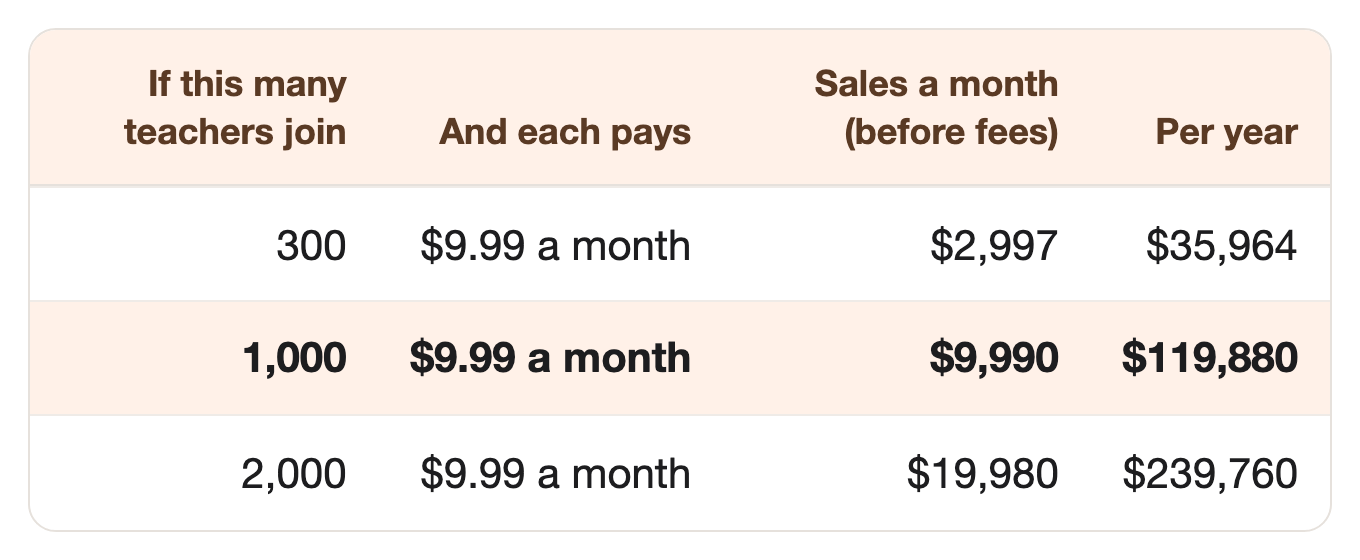
$9.99 a month is Cricut Access’s price.
⠀1,000 members is fewer than 1 in 3,000 US public school teachers, and about 1 in 5,900 of Cricut’s active users.
⠀And if it doesn’t work? Here’s everything you lose:
A few sheets of vinyl and card for test cuts.
One month’s subscription to an AI app, like ChatGPT or Claude.
One week of your time.
You’ll need a Cricut, so this fits best if you or a friend already owns one.
⠀
👉 One idea can cover your bills, and a few ideas together could reach a million in 2 to 3 years.
A classroom club like this could be your first idea, and each idea you add grows your yearly income.
Thinking “why not me?”
Good question. The answer is right below. 👇
If this one’s not for you, see you next week.
That’s it, my fellow contrarians! 🙌
Yours ‘helping you build on what already works’ Vijay Peduru 🦸♂️
⠀
⠀
⠀
🧰 Want to build it? Here’s everything else.
⠀
Step 1: 🎯 Pick one kind of teacher
One kind of teacher, one school year, one machine.
Good news: you don’t have to serve every teacher.
Pick one group, not all teachers.
Kindergarten teachers, who label everything.
Elementary teachers, who change the room every season.
Middle school teachers, who want fewer cute things and more organized ones.
Or party-planning parents, if you’d rather serve families.
Pick the machine your files are tested on.
Say it on every file, so nobody wastes a sheet on the wrong one.
Let your AI find what these teachers make each month.
Part 1 of the prompt reads what they post online and turns it into the year’s plan.
⠀
Step 2: 🗓️ Map the school year
One month at a time, from August to June.
Think of it as the school calendar, but for cutting.
Plan 10 monthly packs, with 5 to 8 projects each.
August: name labels, cubby tags, and a welcome sign.
Fall and winter: bulletin board letters and seasonal decor.
May and June: end-of-year gifts and tags.
Send each pack two weeks before the month starts, so teachers have a weekend to cut.
⠀
Step 3: 🛠️ Make the first pack
Each project is a file, a setup card, and a short guide.
Your AI writes the briefs, and you build the files.
Get a design brief for each project from your AI.
What it is, the words on it, the size, and how many fit on one mat.
Turn each brief into a file in Design Space or another free design app.
Use only your own designs and fonts you have the right to use for sales.
No cartoon characters, brands, or school logos.
Write a setup card and a step-by-step guide for each project, in plain words.
⠀
Step 4: 🔍 Test and check every project
Teachers waste money on every bad cut, so every project gets a real cut and two checks.
Remember that sheet of vinyl in the trash on a Sunday night?
This step is there to stop that.
Cut every file on your own machine.
Write down the size, the material, the setting, and anything that went wrong.
🔍 The AI checker (Part 4 of the prompt). It compares every guide with your test notes, and flags any setting or size you didn’t test.
🧐 The AI critic (Part 5). It reads each guide like a tired teacher on a Sunday, and like someone who just opened the box.
⠀👉 The prompt already follows these rules, and more:
Never invent a machine setting. Only your tested settings go in a guide.
No characters, brands, or logos in any design brief.
Every guide says which machine and material it was tested on.
⠀
Step 5: 🏪 Open the club
Copy Cricut Access: one simple monthly price.
Easy one: use Cricut Access’s prices.
Set your prices.
$9.99 a month, like Cricut Access.
$95.88 a year, Cricut Access’s yearly price.
Pick where to sell. Gumroad or Stan (two creator storefront apps), or your own website, all take monthly payments and send downloads.
Let AI write your sales page, using photos of three real projects from your first pack.
⠀
Step 6: 📣 Get your first members
Be easy to find, give teachers something to pass on, and do one small kind thing.
Put one free project on Etsy, titled with the words teachers type.
Like “kindergarten cubby name labels Cricut file, first day of school.”
Add a one-page guide to the download, ending with an invitation to the club.
Make the last page of every pack one clear ask.
“Know a teacher who just got a Cricut? Send them this month’s free sample.”
Cut free name labels for one school’s new teachers.
Ask the school first, deliver them before the first day, and post the photos on your sales page if the school says yes.
⠀
Step 7: 🏃 Eliminate competitors
Here’s how to stay ahead when the competitors show up.
Compete on “ready the week you need it,” not “the most designs.”
Cricut Access will always have more images. It won’t have the projects a teacher needs in August, ready to cut.
Show each member “Cutting with us since [month].”
Put it in every monthly email, so members can see how long they have been with you.
⠀
Step 8: 🎲 Make it bigger
Other groups make things on a calendar too, and they’d pay for ready-to-cut monthly packs.
Open a second club for another group: party-planning parents, sports coaches, or another grade of teacher.
Three clubs at about $10,000 a month each is about $360,000 a year, before fees. 🎯
⠀
🗓️ Your first week
Phew. That was a lot. 😅
A first version of Steps 1 to 6 fits into seven days. 🚀
By day 7, you have a year’s plan, a tested first pack, a sales page, and one free project on Etsy.
Quick heads-up: the prompt below has seven Parts, and they’re not the same as the Steps above.
Day 1 (Steps 1 and 2): Run Part 0 of the prompt (it’s below), and pick your kind of teacher.
Then map the year with Part 1.
Day 2 (Step 3): Get the design briefs with Part 2, and build the files.
Day 3 (Step 4): Cut every file, and write down what worked.
Day 4 (Steps 3 and 4): Write the guides with Part 3, then check them with Parts 4 and 5.
Day 5 (Step 5): Write your sales page with Part 6, and open the club.
Days 6–7 (Step 6): Write your Etsy listing, last-page ask, and school note with Part 7, and post your free project.
⠀
🏄 How to use the prompt
One prompt does all the AI work, in seven parts, plus a quick market check (Part 0).
Part 1 — Map the school year. Plans 10 monthly packs for your kind of teacher, with send dates.
Part 2 — Brief the designs. Writes a design brief for each project in the first pack.
Part 3 — Write the guides. Writes a setup card and step-by-step guide for each project, from your test notes.
Part 4 — Check the guides. Compares every guide with your test notes and the rules, and flags anything untested.
Part 5 — Find the mistakes. Reads each guide like a tired teacher, and like a first-time Cricut owner.
Part 6 — Write the sales page. Uses your real projects as examples.
Part 7 — Write the first-member kit. Writes your Etsy listing, the last-page ask, and a note to a school.
Run it your way:
Part by part (the default): it pauses after each part, and you type “next” to go on.
All at once: say “run all seven parts.”
Just one part: say “only do Part 3,” or any part you need.
The full prompt is just below, under “📋 The prompt.”
🎙️ Talk to your AI sidekick, don’t type.
Turn on voice mode, or use a dictation app like Wispr Flow.
Say it messy. The AI sorts it out.
Turn it into a skill, so you never paste it again.
Paste the prompt into Claude or ChatGPT, and say: “Turn this into a skill I can save.”
Install once, use forever.
⠀
📋 The prompt
The prompt (copy it into Claude or ChatGPT, fill in the INPUTS part, and run it your way)
CONTEXT:
- You're my product partner. Together we'll build a monthly club of ready-to-cut Cricut projects for one kind of teacher (or the group I name below).
- This prompt has a market check (Part 0) and seven parts (Parts 1 to 7), in order.
- Run it the way I ask:
    - If I say nothing, go one part at a time. After each part, show me the result, then stop and wait. Move on only when I type "next."
    - If I say "run all seven parts," do them all without stopping.
    - If I say "only do Part 3" (or any part), do just that part.
- If a part needs something from me, ask for it before you start that part.
- Follow these rules in every part:
    1. Never invent a machine setting, a blade, a pressure, or a size. Only use the tested settings from my TEST NOTES. If a project has no test note, mark it "NOT TESTED" and leave the setting blank.
    2. No cartoon characters, brands, team names, or school logos in any design. Only original designs, and fonts I have the right to use for sales.
    3. Every guide names the machine and the material it was tested on.
    4. Nothing unsafe for a classroom: no small loose pieces for young children, and no hot tools for students to use.
- Never invent a fact or a number. If you're not sure a fact is right, leave it out.
- Keep web search on for the whole prompt (turn on search in ChatGPT or Claude), so you can open any page you need to check.

=============== INPUTS — edit these, or just run as is ===============

Who the club is for:
{e.g. kindergarten teachers in the US}

My machine and materials:
{e.g. Cricut Joy, permanent vinyl, card stock, transfer tape}

What I already know teachers make each month (paste notes, or leave blank):
{e.g. "August: names on cubbies and book bins", "October: a reading corner sign"}

TEST NOTES (paste after you cut each file; leave blank until then):
{e.g. "Cubby label, 3 x 1 inch, permanent vinyl, Cricut Joy, vinyl setting: clean cut, weeding was easy"}

My prices:
{e.g. $9.99 a month, $95.88 a year}

======================== END OF INPUTS ========================

THE PARTS:

Part 0 — Check the market today.
This part needs web search (turn on search in ChatGPT or Claude). Search for Cricut and cut-file products for my kind of teacher and, for each place, give the count, the three biggest with links, and their prices:
1. Etsy shops selling teacher cut files (SVG files) for my kind of teacher.
2. Teachers Pay Teachers products made for cutting machines.
3. Monthly memberships or file clubs for teachers who craft.
4. The biggest YouTube channels and blogs teaching teachers to use a Cricut.
Then tell me: early (few sellers), growing, or crowded, and which kind of teacher looks least served (for example: kindergarten, middle school, special education, new teachers). Give a link for every number. If you can't open a page, say so. Never guess a number.

Part 1 — Map the school year.
Plan 10 monthly packs, August to June (May and June share one pack), with 5 to 8 projects each, for my kind of teacher. Base them on what these teachers post online about their classroom projects each month (Pinterest, YouTube, teacher blogs, Cricut's blog), plus any notes I paste. Link each source. For each project give: the name, what it's for in the classroom, and why a teacher needs it that month. Give each pack a send date two weeks before its month. Say clearly which choices are your guess.

Part 2 — Brief the designs.
For each project in the first pack, write a design brief I can build in Cricut Design Space or another free design app:
1. What it is, and the words on it.
2. The finished size, and how many fit on one mat for my machine.
3. The shapes and layout, in plain words.
4. The material I should test it on.
Follow rule 2 in CONTEXT. You can't make the file yourself, so give me a brief I can build from.

Part 3 — Write the guides.
Ask me for my TEST NOTES first. For each project, write:
1. A setup card: the machine, the material, the size, and the setting, copied from my TEST NOTES.
2. A step-by-step guide, in plain words, under 150 words, for someone who has never used the machine.
3. One "if it goes wrong" tip from my TEST NOTES.
Follow rule 1 in CONTEXT. If a project has no test note, mark it "NOT TESTED."

Part 4 — Check the guides.
Now act as a separate checker who didn't write these guides. Compare every setup card and guide with my TEST NOTES, and check each rule in CONTEXT, one by one. Mark each project: ready, needs a fix, or not tested. For each problem, quote the words and say what's wrong. Then give a fixed version of every guide that needs one.

Part 5 — Find the mistakes.
Now read every guide twice: once as a tired teacher on a Sunday night, then as someone who just opened a new Cricut. Flag any step that's unclear, any word they wouldn't know, and anything missing. Then give the final guides, with every fix made.

Part 6 — Write the sales page.
Ask me for photos and names of three finished projects from my first pack. Use them as examples. Never invent a result, a review, or a number. Give me:
1. A headline that names my kind of teacher, not "teachers."
2. What members get each month: the files, the setup cards, the guides, and the send date.
3. That every file is test-cut on a real machine before it's sent.
4. The prices, shown up front, and "Cancel any time."
5. A free sample project, in exchange for an email address.

Part 7 — Write the first-member kit.
1. Ask me which project to give away. Write an Etsy title for it with the words teachers search, a short description, and a one-page guide that ends with an invitation to the club.
2. Write the last-page ask for every monthly pack: one line asking members to send the free sample to one teacher who just got a Cricut.
3. Write a short note to a school's principal, offering free name labels for the school's new teachers before the first day. Never promise anything in return, and ask permission to share photos.
⠀
📎 The sources
Every number above, with where it came from.
Jennifer’s background · Number: Founder of PassPorter, a publisher of Disney travel guides, for “nearly 20 years”; her mother “is an artist and crafter”; the craft blog “exploded”; “in 2017, I made the decision to devote myself to JenniferMaker” · Source: JenniferMaker, “Authentically Crafty Life” (2017 post, updated July 8, 2020)
The blog’s money · Number: “from a part-time hobby blog earning $33/mo to bringing in more than 6-figures every month”; Pinterest, then Facebook, then YouTube; “more than 225k subscribers” just over a year after starting on YouTube · Source: Side Hustle Show, episode 381, April 2, 2020
Cricut tutorials, her 2019 income, her group · Number: Cricut crafting tutorials; about $70,000 a month in 2019, mostly from digital courses on crafting with cutting machines; Facebook group of 115,000 members · Source: OMR (German business site), February 24, 2020
Cricut’s users · Number: Just under 5.9 million Active Users; just over 3.09 million Paid Subscribers (users of Cricut Access or Cricut Access Premium), December 31, 2025 · Source: Cricut Q4 and full-year 2025 results, March 3, 2026
Cricut Access · Number: “$9.99 billed monthly or $95.88 billed annually”; “more than 1.6 million images” and “thousands of ready-to-make projects”; Cricut Design Space is “available for free on Android, iOS, Mac OS, and PC devices” · Source: Cricut 2025 annual report (Form 10-K), filed March 4, 2026
Cricut Teachers · Number: “exclusive discounts” for teachers and school administrators; back-to-school projects: lunch bags, pencil holders, custom caddies · Source: Cricut blog, August 8, 2024
A teacher’s labels · Number: Patrice Jenkins, “teacher, education consultant, speaker, and Cricut creator”: “I wanted to number my whiteboards, bins, and folders for my students” · Source: Cricut blog, August 6, 2021
Public school teachers · Number: 3.8 million full- and part-time public school teachers, 2020–21 · Source: NCES, Condition of Education, May 2023
Teachers’ own money · Number: “$895 is the average amount teachers spent out-of-pocket on school supplies during the 2024–2025 school year”; 3,700 K-12 teachers surveyed; one teacher lists “classroom decorations” · Source: AdoptAClassroom.org, June 9, 2025
Teachers Pay Teachers · Number: “its 80,000 contributors earned more than $100 million”; teachers paying “out of their own pockets for classroom-tested materials” · Source: AP, via WTOP, April 13, 2017
Cricut’s artist royalties · Number: “a 50% royalty on a la carte purchases”; “many of those for purchase are 99 cents” · Source: Craft Industry Alliance, October 16, 2022