


Hello contrarians,
Today’s idea is called The Family Park Planner.
Get comfy. 🛋️
First, a programmer’s story. Then, the business you could build from it.
⠀
⚡ Quick facts
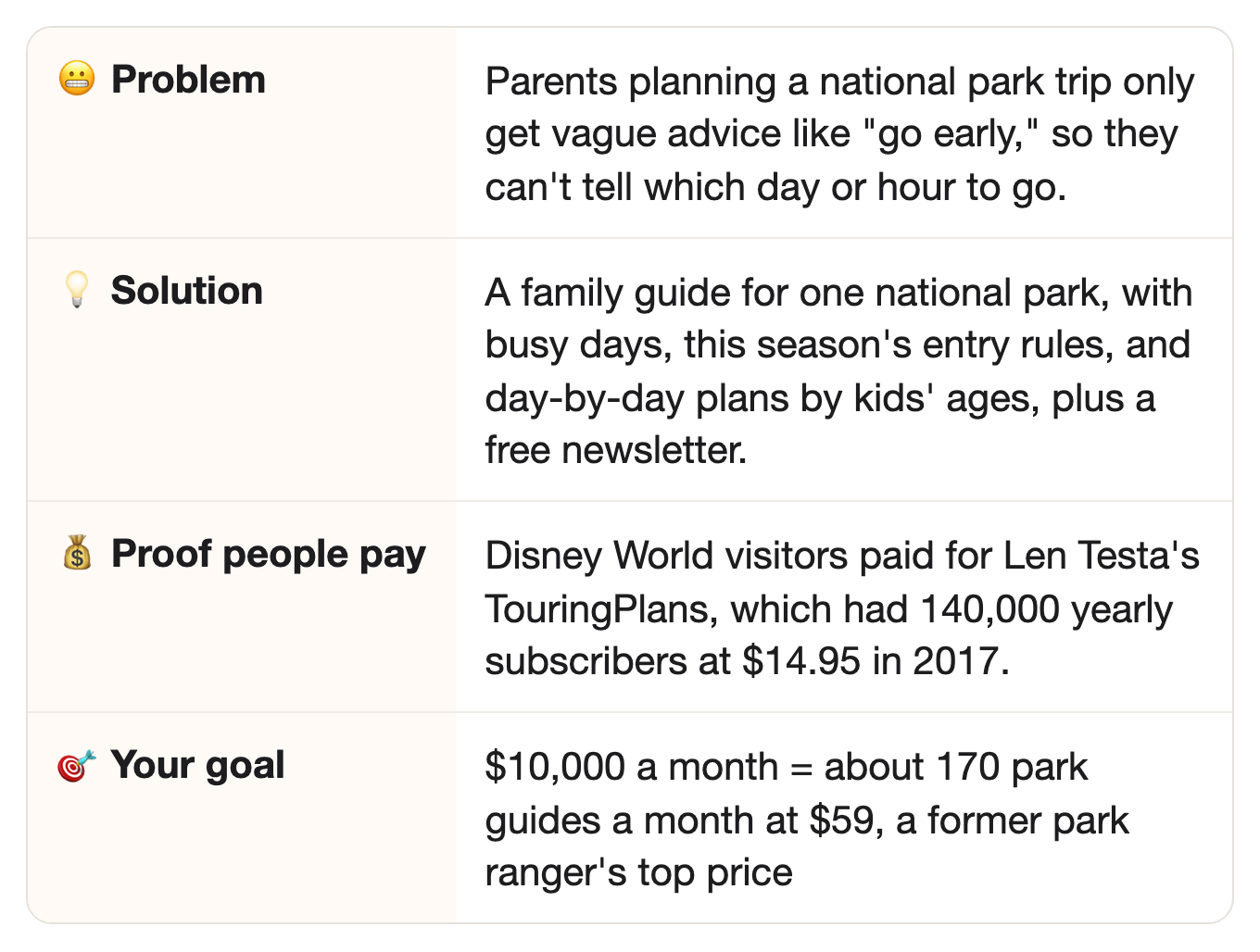
⠀
📖 How one programmer turned a long line into 140,000 subscribers
It started with two hours in the sun.
Len Testa first went to Walt Disney World in 1974, when he was six.
Years later, American Express hired him as a programmer at 19, with no college degree.
And the company later paid for his graduate school.
Then came a family trip, and one ride: the Great Movie Ride.
He and his twin sister waited two hours in line for it.
Outside, with no shade.
Ouch.
So for his master’s degree in computer science, he told his advisers: “I want to write a computer program that routes you around Disney World to avoid lines.”
Fun fact: it built on the PhD work of one of the lead research scientists at UPS, the delivery company.
⠀
Then he did something old-school: he mailed a real paper letter to Bob Sehlinger.
Who’s Bob?
He wrote The Unofficial Guide to Walt Disney World, a planning book for Disney trips.
The book already had its own plans: a step-by-step order of rides for one day, so you reach each ride when its line is short.
Bob called him back, and Len later became one of the book’s writers.
Next, he needed data, lots of it.
So his family walked the same route through the park every 30 minutes, writing down every wait time.
Day after day, summer after summer.
Yep, really.
He finished his thesis in 2000.
But his plans didn’t beat the book’s plans right away.
It took three more years of counting, until 2003.
⠀
His company, TouringPlans, sells those plans online.
“I think we invented the crowd calendar,” he said in 2018.
Wait, what’s a crowd calendar?
It shows how busy the parks will be on each day, so families pick the right days to go.
In 2012, he left American Express, where he had become director of technical architecture.
By 2017, TouringPlans had 140,000 annual subscribers, at $14.95.
And here’s the clever bit: subscribers in the parks send in the wait times they see.
About 8,000 more wait times are added each day.
It had eight full-time staff, including statisticians and programmers, and about a dozen part-timers.
Holy cannoli. 🍰
Quick math: 140,000 subscribers at the 2017 price of $14.95 is about $2.09 million a year.
That’s our math, not a reported number: Popular Science didn’t give his revenue, and not everyone may have paid that price.
From a two-hour line in the sun… to 140,000 yearly subscribers, by writing down wait times until his plans beat the book’s.
⠀
🔗 Same idea, new group
In the story: Disney World visitors paid TouringPlans for crowd calendars and plans that dodge the longest lines.
⠀In this idea: families heading to a big national park need the same kind of plan: which day, which hour, and this season’s entry rules.
⠀Why it carries over: both groups get only a few days, and a plan built on real data shows them the best day and hour.
⠀
💡 The opportunity
Families have the same problem at the big national parks: which day to go and which hour to arrive. And the entry rules can change from one year to the next.
First, who are the buyers?
Parents planning one big national park trip with their kids.
Think Yellowstone, Zion, the Grand Canyon, or the Great Smoky Mountains.
They have a few days off, a long drive, and kids who cry and fight in traffic.
(Parents, you already know how this goes.)
⠀
And lots of people go. Like, a lot.
National parks and other park sites had 323,014,305 visits in 2025, the National Park Service says.
Great Smoky Mountains National Park alone had 11,527,939.
Zion had 4,984,525, and Yellowstone had 4,762,988.
⠀
Here’s the good part for you: the entry rules can change from one year to the next, so an old plan goes stale.
Timed entry, entry reservations, and vehicle reservations all mean the same thing: a booked time slot you need before you can drive in.
Busy parks use them to limit how many cars come in on crowded days.
For 2026, Arches and Yosemite dropped their entry reservations.
Glacier dropped its park-wide vehicle reservations, but still actively manages traffic on Going-to-the-Sun Road.
That’s the main road across the middle of the park.
Rocky Mountain kept its timed entry, from May 22 to mid-October.
See the problem?
A plan written for last season’s rules can point a family the wrong way.
⠀
And the details are easy to miss.
At Rocky Mountain in 2026, one area, the Bear Lake Road corridor, needed a booked time slot to drive in between 5 a.m. and 6 p.m.
The rest of the park needed one to drive in between 9 a.m. and 2 p.m.
Slots opened on the first of each month, on Recreation.gov, the government’s booking site.
Miss that day, and a family may find the good slots gone.
Oof.
⠀
👉 The idea: a free weekly newsletter on what changed at the big parks, plus a paid family guide for one park.
The guide has a crowd calendar and day-by-day plans by kids’ ages.
And the free newsletter?
That’s how families find the guide.
Each week it covers one dated change, like a booking day coming up or a road opening, and links to the guide.
⠀
🧩 What you actually need
One park you know well, or a partner who does.
Good news: no license needed.
A parent who has done the trip three times knows where kids get bored and where the bathrooms are.
⠀
The park service’s free visit counts.
The park service gives away visit counts for every park, back to 1979 for some, and month by month.
AI turns them into a simple crowd calendar.
The counts come by month, so they tell a family which month to pick.
But what about a family that’s already set on July?
For them, the day comes from your own notes and the park’s alerts.
And the hour comes from the entry rules: at Rocky Mountain in 2026, a family that arrived before 9 a.m. needed no booked time for most of the park.
⠀
One hour a week checking the park’s own pages.
Rules, road openings, and booking dates change, and your readers rely on you to notice each change.
Easy part: Part 1 of the prompt does the searching, and you read what it found.
⠀
✅ Why this could work
Three reasons this can pay.
A former park ranger already sells park plans.
Meet Ashli Nudd.
She left her ranger job in 2015, when she had a baby, and started a blog called Dirt In My Shoes.
She sells plans for Acadia, Glacier, Yellowstone, Yosemite, and more, at $29 to $59 each.
In 2024, Thinkific, the course site she sells on, said she’d had over 16,000 customers since 2022, and an annual six-figure revenue.
⠀
Families need a fresh plan every year.
Theme park fans have paid for planning books since 1985, when the first Unofficial Guide to Walt Disney World came out.
And fans bought a new edition almost every year: it reached its 30th edition by 2015.
Thirty editions!
At the national parks, the rules can change each season, so families need a plan checked for their trip.
⠀
People pay for planning, even when the park’s own pages are free.
TouringPlans charged $24.97 for a year of its Disney World plans, in a June 2026 copy of its page.
Its founder’s pitch: “The average four-day trip to Walt Disney World for a family of four costs over $3,000.”
So next to a $3,000 trip, $24.97 for a plan is a small extra cost.
⠀
👉 Curious where these numbers come from? Every source is linked in the last section, “📎 The sources.”
⠀
📊 More proof people want this
Want more? Here you go.
Park fans sign up for trip help in big numbers.
Ashli’s email list had over 50,000 subscribers in 2024.
Her buyers include “married people with kids who take family vacations.”
⠀
Crowds are the main worry.
Ashli says she helps people avoid the crowds, “because the national parks have gotten so crowded.”
People kept asking her how she gets a parking spot they couldn’t get.
Ha. Fair question.
⠀
👉 Families already pay for plans that help them avoid the crowds.
⠀
🔍 Who’s already doing it
Who sells park plans, and what none of them offers.
TouringPlans, Len’s company from the story, covers theme parks.
Its menu, in a June 2026 copy of its site, lists Disney World, Universal Orlando, Disneyland, and Disney Cruise Line.
No national parks on it.
⠀
Ashli’s Dirt In My Shoes sells plans for Yellowstone and about 15 more parks and monuments.
A national monument is protected land the park service runs, like a smaller park, not a statue.
She writes for everyone: people in their 20s, retirees, and families.
Her plans, as Thinkific describes them, aren’t split by kids’ ages.
⠀
The park service’s own pages have the rules.
Those pages are good for the rules.
But each park has its own page, and none of them tells a family which day to come with a five-year-old.
⠀
Still missing when we checked:
A crowd calendar for one national park, built from the park service’s own visit counts.
Day-by-day plans split by kids’ ages, like under 6, 6 to 12, and teens.
A weekly note on what changed at the big parks this season.
⠀
🔎 Check the market yourself in 2 minutes: run Part 0 of the prompt, under “📋 The prompt” below.
Your AI searches Etsy, guide shops, travel newsletters, and trip-planning apps that day.
Then it tells you: early, growing, or crowded.
Etsy is a website where small shops sell digital files, including printable trip plans.
Early? Start now.
Crowded? Good news: it means families pay.
Just pick one park and one age group (Step 1 of the build plan).
A crowded market is still OK. You win by serving one group better, not by being first.
⠀
👉 That’s the gap you can fill: a family guide to one national park, with this season’s rules, a crowd calendar, and plans for each age.
⠀
🤖 Why AI won’t replace it
Could ChatGPT just do this? Sort of, if someone gives it this season’s rules, the busy days, and the kids’ ages. Your guide has already gathered all of that, so the family doesn’t have to.
🔮 Honest note: a personal AI agent can already read a park’s web page and draft a trip.
So a plan alone isn’t the product.
The product is this season’s rules, checked and dated, plus a crowd calendar from real counts, shaped around kids.
⠀
1. Checked twice.A wrong booking date can cost a family the whole day.
Every rule in your guide links to the park’s own page, with the date you checked it.
⠀
2. You choose what’s right for them.A busy parent doesn’t know which trail is too long for a four-year-old, or when to break for lunch.
That’s your job.
You pick the short trails, the stops, and the backup plan for a rainy afternoon.
⠀
3. The crowd calendar.It comes from years of the park’s own visit counts, sorted and checked.
Few parents will download the data and chart it the night before a trip.
Would you?
Probably not.
⠀
4. Ready when they need it.The guide is waiting on their phone, with no prompt to write in the car.
Nobody wants to type prompts with two kids asking “are we there yet?”
⠀
👉 The park’s own pages are free, but a checked plan for a family with kids, ready on their phone, isn’t.
⠀
💵 How much you can make
Let’s run the numbers.
Here’s the short version: 170 guides a month at $59 is about $10,000 a month.
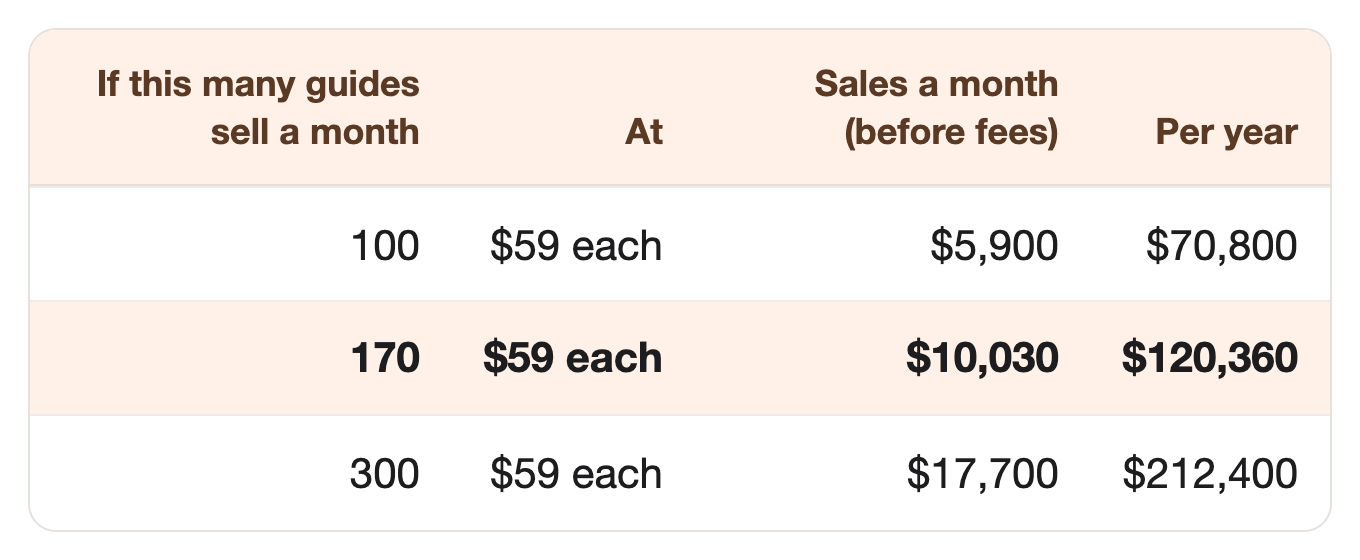
$59 is Ashli’s price for her biggest five-day plans.
⠀Your goal is about a third of how many guides Ashli sells.
Here’s how: 170 guides a month is about 2,040 a year.
Ashli had over 16,000 customers between 2022 and July 2024, more than 6,000 a year, across her guides for many parks and monuments.
You start with one park, then add a park each season, the way she did.
⠀
And if it doesn’t work? Here’s all you lose:
Nothing for the newsletter, if you start on a free plan.
One month’s subscription to an AI app, like ChatGPT or Claude.
One week of your time.
⠀
👉 One idea won’t make a million, but three or four might in 2 to 3 years, and this could be your first.
Want to try this one?
The whole plan, the prompt included, is below. 👇
If it’s not your thing, see you next week with a fresh idea.
That’s it, my fellow contrarians! 🙌
Yours ‘showing you how many ways there are to make money’ Vijay Peduru 🦸♂️
⠀
⠀
⠀
🧰 Want to build it? Here’s everything else.
⠀
Step 1: 🎯 Pick one park and one kind of family
One park, one age group, one season.
Pick one park.
One you know well, or one a partner knows well.
Busy parks with booking rules or crowded roads are the best fit.
Pick one kind of family.
Families with kids under 6.
Families with kids 6 to 12.
Families with teens who want harder hikes.
Write it in one line, like “Rocky Mountain National Park for families with kids under 6, in summer.”
⠀
Step 2: 📅 Build the crowd calendar
Copy Len: count first, then plan.
Good news: you don’t have to walk the park every 30 minutes.
The park service already counts visits for you.
Download the month-by-month visit counts for your park from the park service’s visitation statistics pages.
Paste them into the prompt’s INPUTS, where Part 2 picks them up.
Your AI sorts the busy and quiet months, and rates each one from quiet to packed.
Add your own notes after each visit, like the time the parking lots filled.
⠀
Step 3: 🗺️ Write the family guide
A plan for each day, made for the kids’ ages.
Gather this season’s rules with Part 1.
Entry bookings, road openings, shuttles, and fees, each with a link to the park’s own page.
Write the day plans with Part 3.
When to arrive, which short trails, where to stop for lunch and bathrooms, and a rainy-day backup.
Add a one-page “night before” checklist.
⠀
Step 4: 🔍 Check every guide
Families build a whole trip on this, so your AI writes every guide, then checks it twice.
Your AI does all three passes for you: it writes in Part 3, and checks in Parts 4 and 5 of the prompt.
🖊️ The AI writer. It writes each day plan from the rules and the crowd calendar you gathered.
🔍 The AI checker. A second pass checks every rule, date, and hour against the park’s own page, and flags anything without a link.
🧐 The AI critic. A third pass reads it like a tired parent with two kids, and like a strict park ranger.
Re-check every rule each season, and put the date you checked on the guide.
⠀👉 The prompt already follows four safety rules:
Every rule, fee, date, and hour links to the park’s own page, with the date it was checked.
Every guide says: “Check the park’s official page before you leave. Rules change.”
No promises of empty trails or no crowds.
Follow the park’s own rules on wildlife, trails, and heat, and never suggest leaving a marked trail.
⠀
Step 5: 🏪 Open the newsletter and the shop
Free newsletter first, paid guide second.
Start the free weekly newsletter on Substack or any free newsletter app.
One section on what changed at the big parks, one on the busy months ahead.
Sell the family guide for $59, like Ashli’s top price.
Later, add a yearly crowd-calendar plan, like TouringPlans’ $24.97 a year.
Let AI write your sales page with Part 6 of the prompt, using one real day plan as the example.
Never use the park service’s arrowhead logo, or suggest you speak for the park.
The arrowhead is the park service’s official badge.
On your guide, it makes families think the park wrote it.
⠀
Step 6: 📣 Get your first readers
Ask one good question, answer reporters who need an expert, and publish one crowd report every season.
Ask one question at signup: “Which park, and how old are your kids?”
Then send the free sample day that fits their answer.
Add a “skip” option that says what they’ll miss.
Reply to reporter requests about summer park trips.
Reporters post questions on sites like Qwoted and Featured when they need someone to quote in a story.
A useful answer can put your name and newsletter in that story, in front of parents who have never heard of you.
Check those sites each day, and answer within the hour with three short, useful sentences.
Publish one short crowd report every season, under the same name, like the “Family Park Crowd Index.”
The busiest and quietest months for your park, from the park service’s counts.
Reporters and parents quote a number they see every season.
⠀
Step 7: 🏃 Eliminate competitors
Copycats will come. Here’s how you stay first.
Keep your own dated crowd log for your park, with every visit and every rule change, season after season.
A new rival would start from zero.
Serve families with young kids, the families that big trip guides give only one paragraph.
Nap times, short trails, and bathroom stops are your whole job.
⠀
Step 8: 🎲 Make it bigger
Add parks, then add a yearly plan.
Add a second park near the first, for families on a road trip.
Add a yearly crowd-calendar plan for families who visit every summer.
Three parks at about $10,000 a month each is about $360,000 a year, before fees. 🎯
⠀
🗓️ Your first week
Phew. That was a lot. 😅
A first version of Steps 1 to 6 fits into seven days. 🚀
By day 7, you have this season’s rules, a crowd calendar, one checked family guide, a sales page, and your first newsletter issue.
Quick heads-up: the prompt below has seven Parts, and they’re not the same as the Steps above.
Day 1 (Step 1): Run Part 0 of the prompt (it’s below), and pick your park and kind of family.
Day 2 (Steps 2 and 3): Gather this season’s rules with Part 1, and build the crowd calendar with Part 2.
Days 3–4 (Steps 3 and 4): Write the day plans with Part 3, then check them with Parts 4 and 5.
Day 5 (Step 5): Write your sales page and shop listing with Part 6, and open the shop.
Days 6–7 (Steps 5 and 6): Write your first newsletter issue, signup question, and reporter replies with Part 7.
⠀
🏄 How to use the prompt
One prompt does all the AI work, in seven parts, plus a quick market check (Part 0).
Part 1 — Gather this season’s rules. Finds the park’s entry bookings, road openings, shuttles, and fees, each with a link and a date.
Part 2 — Build the crowd calendar. Turns the visit counts you paste into busy and quiet months.
Part 3 — Write the day plans. Writes a day-by-day plan for your kind of family, plus a “night before” checklist.
Part 4 — Check the facts. Checks every rule, date, and hour against the park’s own page, and flags anything without a link.
Part 5 — Find the mistakes. Reads it like a tired parent, and like a strict park ranger.
Part 6 — Write the sales page. Uses one of your real day plans as the example, and writes a shop listing.
Part 7 — Write the first newsletter and first-reader kit. Writes your first issue, the signup question and welcome emails, reporter replies, and your seasonal crowd number.
Run it your way:
Part by part (the default): it pauses after each part, and you type “next” to go on.
All at once: say “run all seven parts.”
Just one part: say “only do Part 3,” or any part you need.
The full prompt is just below, under “📋 The prompt.”
🎙️ Talk to your AI sidekick, don’t type.
Turn on voice mode, or use a dictation app like Wispr Flow.
Say it messy. The AI sorts it out.
Turn it into a skill, so you never paste it again.
Paste the prompt into Claude or ChatGPT, and say: “Turn this into a skill I can save.”
Install once, use forever.
⠀
📋 The prompt
The prompt (copy it into Claude or ChatGPT, fill in the INPUTS part, and run it your way)
CONTEXT:
- You're my trip-planning partner. Together we'll build a free weekly newsletter and a paid family guide for one national park.
- This prompt has a market check (Part 0), then seven parts (Part 1 to Part 7), in order.
- If I say "run all seven parts," do Part 1 to Part 7. Run Part 0 only when I ask for it.
- Run it the way I ask:
    - If I say nothing, go one part at a time. After each part, show me the result, then stop and wait. Move on only when I type "next."
    - If I say "run all seven parts," do them all without stopping.
    - If I say "only do Part 3" (or any part), do just that part.
- If a part needs something from me, ask for it before you start that part.
- Families will plan whole trips on this. Follow these rules in every part:
    1. Every rule, fee, booking date, opening date, and hour must link to the park's own official page, with the date you checked it. If you can't find it there, say so and leave it out.
    2. End every guide with this line: "Check the park's official page before you leave. Rules change."
    3. Never promise empty trails, no crowds, or a parking spot.
    4. Follow the park's own rules on wildlife, trails, and heat. Never suggest leaving a marked trail or getting close to animals.
    5. Never say or hint that we are the National Park Service, and never use its logo.
- Never invent a fact or a number. If you're not sure a fact is right, leave it out.
- Keep web search on for the whole prompt (turn on search in ChatGPT or Claude), so you can open any page you need to check.

=============== INPUTS — edit these, or just run as is ===============

The park:
{e.g. Rocky Mountain National Park}

The kind of family:
{e.g. two parents, kids aged 4 and 7, first visit}

The trip:
{e.g. three days in mid-July, driving in from Denver}

The park's visit counts (paste from the park service's visitation statistics pages, or leave blank):
{e.g. recreation visits by month for the last five years}

My notes from past visits (or leave blank):
{e.g. "the Bear Lake lot was full by 8 a.m. on a July Saturday"}

My price:
{e.g. $59 for the family guide}

======================== END OF INPUTS ========================

THE PARTS:

Part 0 — Check the market today.
This part needs web search (turn on search in ChatGPT or Claude). Search for paid trip plans for my park and, for each place, give the count, the three biggest with links, and their prices:
1. Etsy and other shops selling printable itineraries or guides for this park.
2. Travel newsletters and blogs that sell plans for this park.
3. Trip-planning and audio-tour apps that cover this park.
4. Free planning help from the park, its partner groups, and nearby towns.
Then tell me: early (few sellers), growing, or crowded, and which kind of family looks least served (for example: families with toddlers, families with teens, grandparents with grandkids). Give a link for every number. If you can't open a page, say so. Never guess a number.

Part 1 — Gather this season's rules.
Search the park's official pages and list everything a family needs to know for my trip dates: entry or vehicle bookings and when they open, road and trail openings, shuttles, fees, and any area that's closed. For each item, give the link and the date you checked. Mark anything that changed from last season, if the park's page says so.

Part 2 — Build the crowd calendar.
Use the visit counts in my INPUTS. If they're blank, ask me to paste them first, and never make them up. Rank the months from quietest to busiest, and give each a rating: quiet, busy, or packed. Rate single weeks only where my notes back it up. Add my notes from past visits. Say clearly which parts come from the counts and which are my notes.

Part 3 — Write the day plans.
Using Parts 1 and 2, write a day-by-day plan for my kind of family:
1. When to arrive, and why.
2. Two or three stops or short trails that fit the kids' ages, with the trail length from the park's page.
3. Where to break for lunch, snacks, and bathrooms.
4. A backup plan for rain, heat, or a full parking lot.
5. A one-page "night before" checklist.
End with the line from rule 2 in CONTEXT.

Part 4 — Check the facts.
Now act as a separate checker who didn't write this guide. Open the link for every rule, date, fee, hour, and trail length, and mark each one: confirmed, changed, or no source. Check every line against the rules in CONTEXT. Quote each problem and give a fixed version.

Part 5 — Find the mistakes.
Now act as a tired parent with two kids, then as a strict park ranger. As the parent, flag any step that's too long, too early, or confusing. As the ranger, flag anything unsafe, against park rules, or out of date. Then give the final guide, with every fix made.

Part 6 — Write the sales page.
Ask me for one finished day plan first. Use it as the example. Never invent a result, a review, or a number. Give me:
1. A headline that names my park and my kind of family.
2. What they get: the crowd calendar, the day plans, the rules with dates, and the checklist.
3. When the rules were last checked.
4. The price, shown up front.
5. A free sample day, in exchange for an email address.
Then write a short shop listing whose title uses the words parents type, like "[park] itinerary with kids."

Part 7 — Write the first newsletter and first-reader kit.
1. My first newsletter issue: what changed at my park this season (from Part 1), the busiest and quietest months ahead (from Part 2), and one tip for families. Every rule gets its link.
2. A signup question, "Which park, and how old are your kids?", with three answer choices and a "skip" option that says what they'll miss. Then three short welcome emails, one for each answer.
3. Three short replies to reporter requests about summer park trips with kids: three useful sentences each, no sales pitch.
4. A short seasonal note called the "Family Park Crowd Index": the busiest and quietest months for my park, from Part 2, with the source named.
⠀
📎 The sources
Every number above, with where it came from.
TouringPlans in 2017 · Number: “140,000 annual subscribers”; “$14.95”; “eight full-time staff members and dozen part-time employees,” including statisticians and programmers; “8,000 additional wait times clocked daily”; subscribers clock their waits in the Lines app; Crowd Calendar “displaying how busy each theme park will be in advance”; Len co-writes The Unofficial Guide · Source: Popular Science, November 1, 2017
Len’s start · Number: “Amex hired me as a programmer when I was 19, without a degree”; Amex paid for grad school; “we waited in line for two hours for the Great Movie Ride,” outdoors, with no shade; “I want to write a computer program that routes you around Disney World to avoid lines”; his thesis “expanded on the PhD dissertation of one of UPS’ lead research scientists”; “I mailed him a physical letter”; his family walked a set route every 30 minutes, “day after day after day”; graduated in 2000; “3 years of data collection” until “2003”; “When I left in 2012, I was their director of technical architecture” · Source: Coaster101, Part One, August 7, 2018
The crowd calendar · Number: “I think we invented the crowd calendar” · Source: Coaster101, Part Three, August 21, 2018
Len’s first trip and thesis · Number: First visit in 1974, at age 6, with his twin sister; computer science; “I finished my Masters thesis in 2000”; his plans first beat the book’s in 2003 · Source: The Unofficial Guides, April 8, 2020
The first Unofficial Guide · Number: “the very first, 1985 edition”; the 30th edition · Source: The Unofficial Guides, August 11, 2015
TouringPlans’ price and menu · Number: “For only $24.97 you get a full year of access”; “The average four-day trip to Walt Disney World for a family of four costs over $3,000”; menu lists Walt Disney World, Universal Orlando, Disneyland, Disney Cruise Line · Source: TouringPlans join page, archived June 8, 2026
The money math · Number: 140,000 × $14.95 (the 2017 price) ≈ $2.09 million a year (our math, not a reported revenue; assumes everyone paid that price); 170 × $59 = $10,030 a month · Source: Popular Science, above; Thinkific, below
Ashli Nudd, Dirt In My Shoes · Number: Former park ranger; started in 2015 after having a baby; plans for Yellowstone and about 15 more parks and monuments, including Acadia, Glacier, and Yosemite; plans for trips of up to five days; “$59” for her most expensive (5-day) plans, “$29” the cheapest; “over 16,000 customers and counting” since switching to Thinkific in 2022; “an annual six-figure revenue”; “over 50,000 subscribers”; “the national parks have gotten so crowded”; questions about “a specific parking spot”; buyers include “married people with kids who take family vacations” · Source: Thinkific, July 15, 2024 (copy archived June 9, 2026)
Park visits in 2025 · Number: 323,014,305 recreation visits (406 parks report); Great Smoky Mountains 11,527,939; Zion 4,984,525; Yellowstone 4,762,988; visit data for every park, “dating back to 1979 for some parks” · Source: National Park Service, March 13, 2026
Month-by-month visit data · Number: “monthly visitation estimates from 1979 to present”; the dashboard shows visits “at the monthly or annual level” for a specific park · Source: National Park Service, Visitor Use Statistics Dashboard (page last updated March 26, 2026)
2026 entry rules · Number: Arches: no timed entry in 2026; Yosemite: no advance reservations in 2026; Glacier: no park-wide vehicle reservations in 2026, “active management of Going-to-the-Sun Road”; Rocky Mountain keeps timed entry, late May through mid-October · Source: National Park Service, February 18, 2026
Rocky Mountain’s 2026 timed entry · Number: Starts May 22, 2026; Bear Lake Road corridor “5 a.m. to 6 p.m.”; rest of park “9 a.m. to 2 p.m.”; reservations released on the 1st of each month on Recreation.gov · Source: National Park Service, Rocky Mountain, February 18, 2026