


Hello contrarians,
Today’s idea is called The Live Translator for Gatherings.
Grab a pen. 🖊️
First, a small app’s story. Then, the business you could build from it.
⠀
⚡ Quick facts
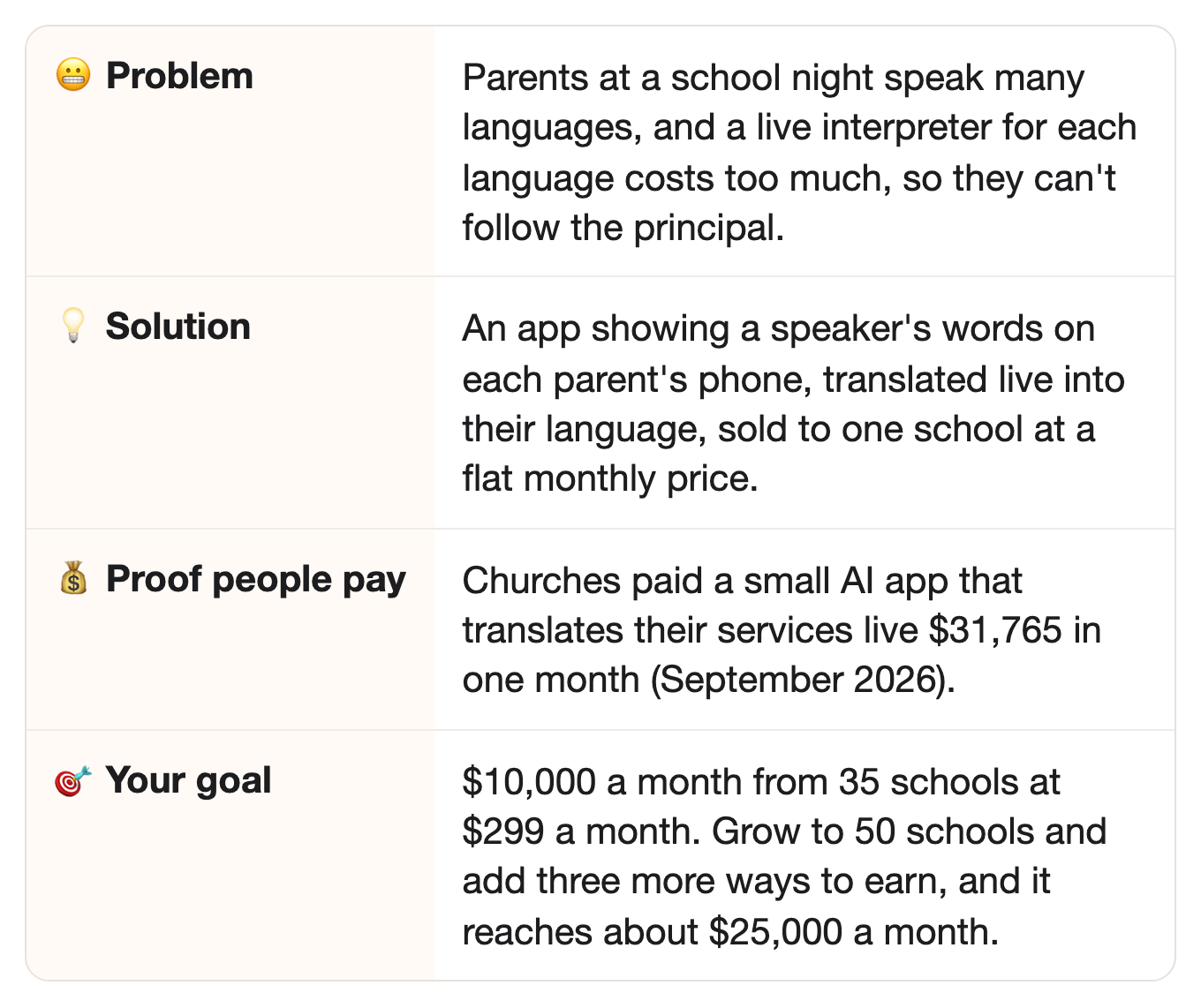
⠀
📖 How one small app made $31K in a month
It started with churches full of people from different countries.
In June 2025, a founder named Anton K. starts an app called Glossa.live.
⠀It’s built for churches with people from many countries in one room.
A live human translator for each language costs too much.
Sound familiar?
Yep, schools have the same problem at family nights.
⠀
So here’s how Glossa works:
The church connects its microphone.
Listeners open a page on their phone and pick their language.
Then they read the translation, or listen in their earbuds, about a second behind the speaker.
⠀
His prices:
$5 an hour, per language, if you pay as you go.
Or $99, $299, or $499 a month for the bigger plans.
⠀
Here’s the cool part: when we checked, Glossa’s App Store app had only 2 ratings.
Wait, only two?
Yep, because the money doesn’t come from listeners.
It comes from the churches, who pay every month.
⠀
In November 2025, Glossa took in $7,040.
⠀Fast-forward to September 2026: it took in $31,765.
Hot diggity dog. 🌭
Glossa went from $7,040 a month… to $31,765 a month, by putting a church’s words on every listener’s phone, in their own language.
⠀
🔗 Same idea, new group
In the story: churches with people from many countries pay Glossa every month to put the service on each listener’s phone, in their own language.
⠀In this idea: schools need the same thing at family nights, when the principal talks to a room of parents who speak many languages.
⠀Why it carries over: both have one speaker, a room full of languages, and a live interpreter for each language costs too much.
⠀
💡 The opportunity
Schools have the same problem at every family night, and Glossa is built for churches.
First, what’s a family night?
It’s an evening when a school invites parents in: back-to-school night, a reading night, a talk about the new school year.
The principal talks to a full room, and every parent needs to follow along.
⠀
In fall 2021, 10.6% of US public school students were English learners.
That’s 5.3 million children.
That’s a lot of kids still learning English.
And the US had 98,577 public schools in 2020–21.
⠀
Small detail, big deal: schools must share information with parents who aren’t fluent in English “in a language they can understand.”
That’s from a January 2015 fact sheet by the US Departments of Justice and Education.
It covers school programs, report cards, and parent-teacher conferences.
And a school may not ask a student or a sibling to interpret for a parent.
The help must come from “appropriate and competent” people, so the school decides where an AI app fits.
In plain words: the school has to reach parents who aren’t fluent in English, in a language they understand.
⠀
👉 The idea: a small app that live-translates a school event onto parents’ phones, sold to the school at a flat monthly price.
⠀
🧩 What you actually need
No coding.
AI tools build the app from a plain description.
Yes, really.
⠀
A bilingual volunteer.
That’s someone who speaks two languages well.
They check the key words the school uses, like the names of its programs.
⠀
Short talks with a few principals.
They tell you which languages and which words matter most.
⠀
👉 The app translates what’s said, and never changes it.
⠀
🗣️ What it looks like
Here’s a made-up example of one back-to-school night.
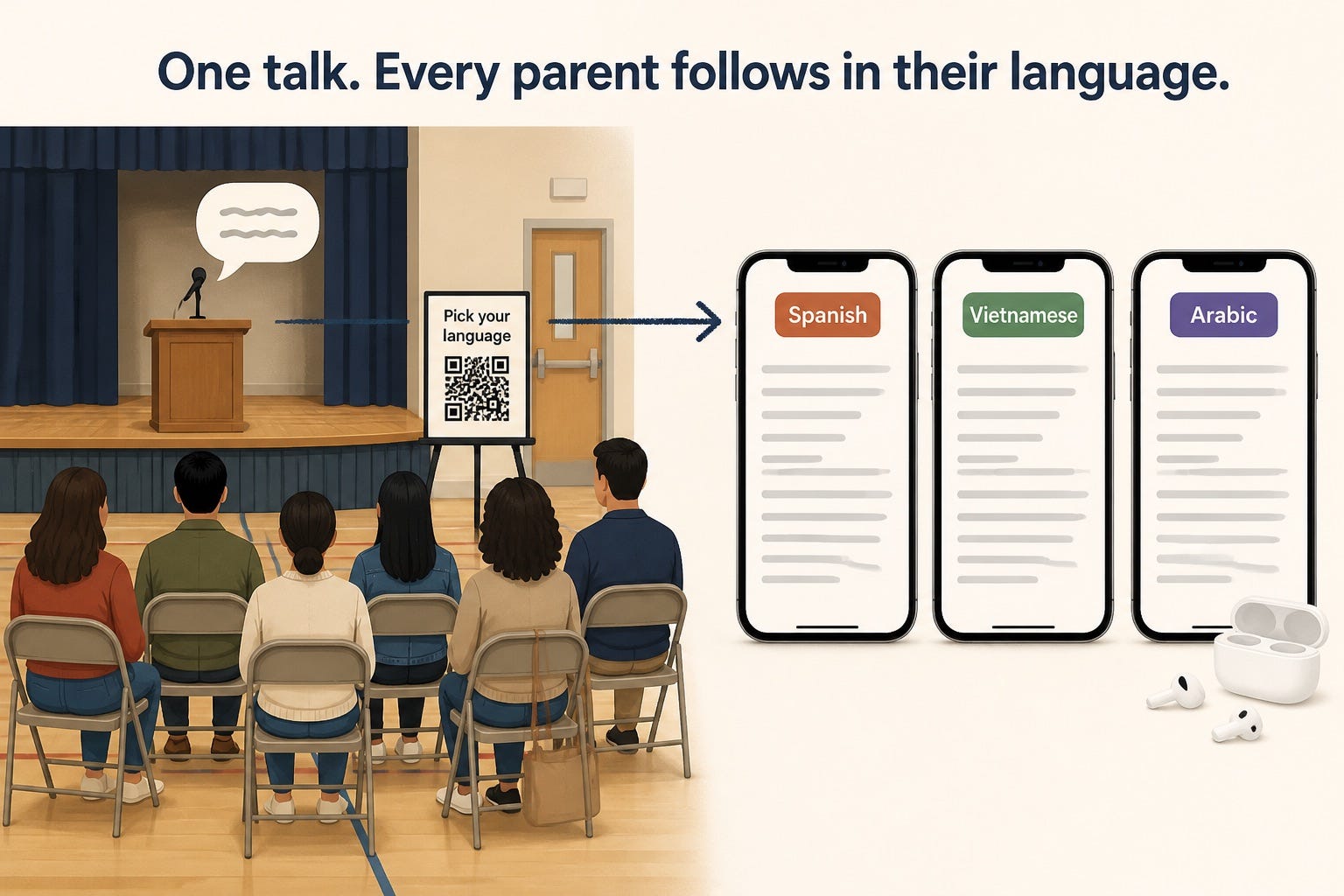
At the door: a small sign with a QR code says “Live translation. Pick your language.”
One parent scans it, picks Spanish, and puts in her earbuds.
Another parent picks Vietnamese, and reads along on a silent phone.
When the principal names the after-school program, the screen shows the wording the school approved, every time.
Every screen carries one line: “AI translation. Key terms checked by our school.”
⠀
👉 One QR code gives every parent the talk in their own language, and the school stays in charge of the wording.
⠀
✅ Why this could work
Three reasons there’s real money here.
Someone already made tens of thousands in a month with this model, and selling translation to schools is a proven business.
Glossa made $31,765 in September 2026, from churches paying monthly.
Yep, the same Glossa from the story.
TalkingPoints, a tool that translates messages between schools and families, says 1 in 4 US schools use it.
Wordly, an AI live-translation tool, sells schools packages of translation hours.
Schools use those hours for PTA (parent-teacher group) meetings, board meetings, and graduations.
⠀
New families arrive every school year. 🔁
New families arrive every fall, and family nights run all year.
The rule to reach parents in their language doesn’t go away.
⠀
AI makes it cheap enough for one school.
Lingopal, a translation company, says human interpreting runs around $150 an hour per language.
Glossa charges $5 an hour per language.
$150 versus $5.
That price gap is what lets a single school say yes.
⠀
👉 Don’t take my word for it. Every number is linked in “📎 The sources,” at the very end.
⠀
📊 More proof people want this
Want more? Here you go.
Organizers already pay for live translation.
Glossa had 100 active subscriptions when we checked, on plans from $99 to $499 a month.
Wordly’s general pricing page says prices start at about $1,500 for a 10-hour package, used within 12 months.
Maestra, another live-translation tool, lists a plan for recurring live events at $449 a month, or $359 a month paid yearly.
⠀
Schools already try AI translation with parents.
Lingopal says a US public school district uses it at parent-teacher conferences.
Parents open a link on their own phones, instead of waiting for a booked interpreter.
⠀
Human interpreters cost real money.
Interpreters and translators earned a median $28.93 an hour in pay in May 2025.
The median is the one in the middle of the pay range.
An event in four languages needs four of them.
⠀
The big picture. 💰
In 2019, 67.8 million people in the US spoke a language other than English at home.
That’s up from 23.1 million in 1980.
Almost triple.
Among speakers of the five most common ones, 30% to 57% spoke English “less than very well,” depending on the language.
⠀
What a church that pays Glossa says.
“We could never have afforded a live translator for each one, plus all the extra equipment that goes with them.”
That’s the whole pitch, in one line.
⠀
👉 Schools need to reach every family, and they already pay to make it happen.
⠀
🔍 Who’s already doing it
One proven player, a few bigger tools, and the hole they leave.
Glossa, the app from the story above, is built for churches.
Its own line: “#1 Real-time AI Translation for Churches and Christian Events.”
It promotes AI trained on the Bible, for scripture and church terms.
Handy for a sermon.
But a school needs different words, like its programs, its grades, and its forms.
⠀
Bigger tools sell to schools, mostly by the hour, when we checked.
Wordly, an AI live-translation tool, sells 10-hour packages, and quotes bigger plans.
Lingopal, another AI translation tool, lists a room cost of $25 an hour.
Maestra, a live-translation tool, has a monthly plan that allows up to 50 viewers at once and 3 languages per session.
⠀
Still missing from those tools, when we checked:
A flat monthly price, with no cap on listeners, set up for one school’s family nights.
Glossa has the flat price, but it’s built for churches.
A tool sold to the principal of a single school, not to a whole district by quote.
⠀
🔎 Check the market yourself in 2 minutes: run Part 0 of the prompt in the build plan below.
Your AI searches the app stores and the web that day.
Then it tells you: early, growing, or crowded.
Early? Start now.
Crowded? Good news: it means schools want this. Pick one kind of event, like back-to-school nights (Step 1 of the build plan).
A crowded market is still OK. You win by being the one a school trusts, not by being first.
⠀
👉 That gap is your chance: a flat monthly price, with no cap on listeners, sold to one school for its family nights.
⠀
🤖 Why AI won’t replace it
AI translates well. Yours gives the school the exact words it approved.
So could a parent just use a free translator app on their own phone?
Sort of, but the school has no say in it.
It gets the important words right.
A bilingual person from the school checks the key terms once, and the app uses them at every event.
AI gets a program’s name right when it’s handed the approved wording, and a parent’s own app never gets that list.
⠀
The school decides.
The principal picks the languages, the key terms, and what gets translated.
A parent’s own app isn’t set up by the school.
⠀
Easy to use: one QR code, every language.
Nobody downloads anything or sets anything up.
Phones stay silent, and nobody holds one up toward the speaker.
Scan, pick a language, done.
⠀
Proof people pay for this: free translator apps exist.
Even so, 100 subscriptions still paid Glossa when we checked.
Remember who pays Glossa?
The churches, not the listeners.
⠀
👉 Free translator apps exist, but a school pays for a finished setup with its own words already checked.
⠀
💵 How much you can make
Here’s the math.
First stop: $10,000 a month from the app alone
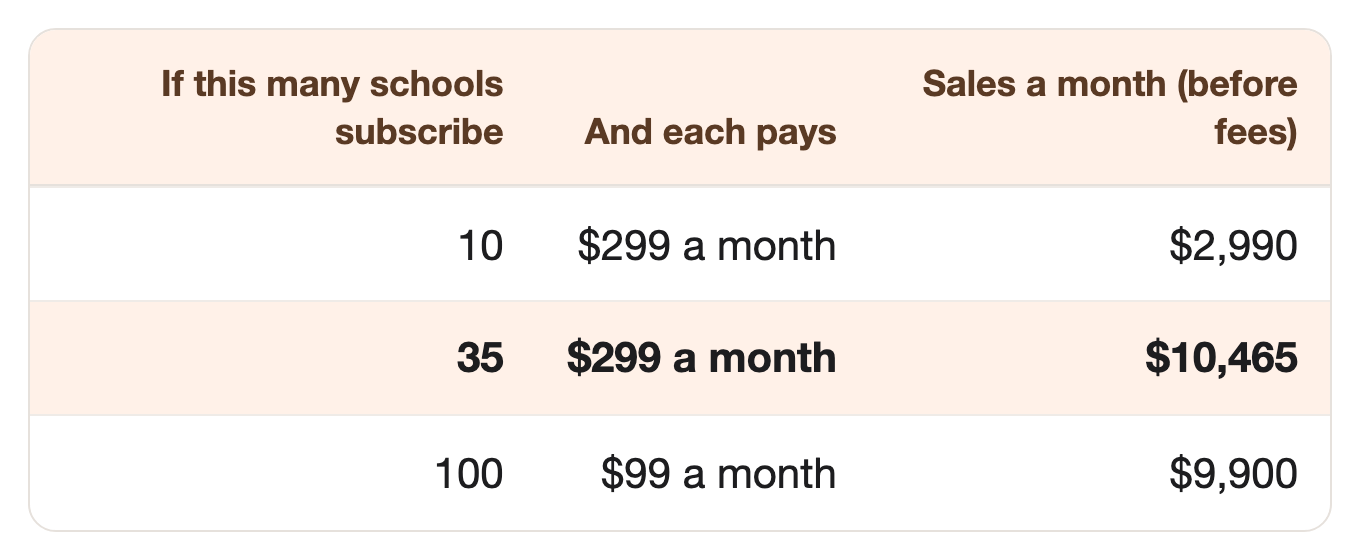
The prices are Glossa’s own: $299 a month for one plan, $99 for a smaller one.
⠀35 schools is about 1 in 2,800 US public schools.
Glossa had 100 subscriptions when we checked.
Next stop: $25,000 a month, with three more ways to earn
Once one school trusts your app, the people around it may buy too.
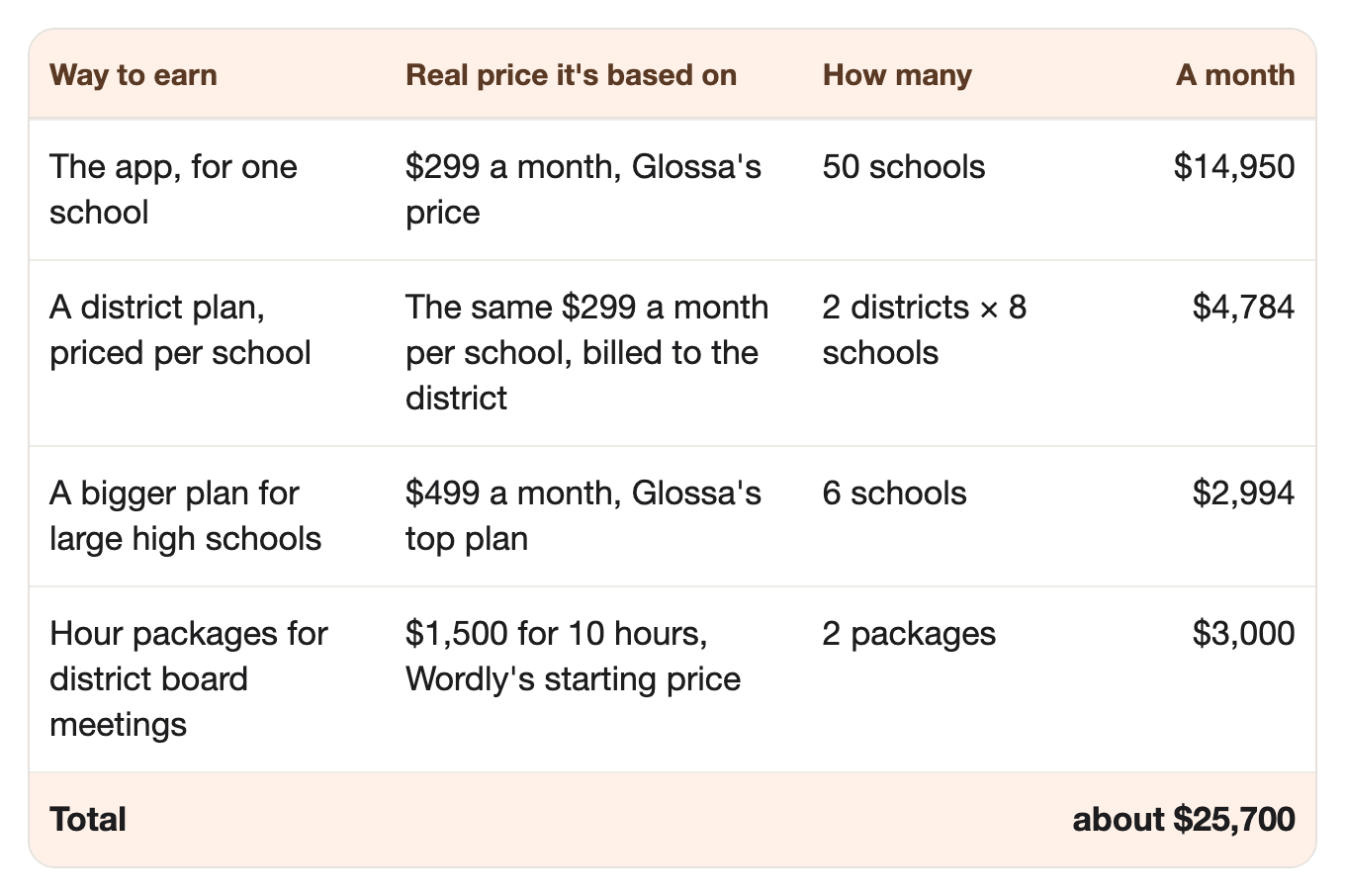
The single-school app still does most of the work.
Grow it from 35 to 50 schools, and it brings in $14,950 a month.
Yearly plans bring in a bit less, since they get two months free.
⠀
The district plan is the big jump.
One district office signs up, and eight schools get the app.
One sale, eight schools.
⠀
The bigger plan is for high schools with lots of events.
Think graduations, sports banquets, and family nights all year.
Glossa’s top plan includes 250 translation hours a month, instead of 100.
⠀
Board meetings are sold by the hour.
A school board meeting is the public meeting where the district’s leaders vote.
Wordly sells 10-hour packages, starting at about $1,500, to be used within 12 months.
Two new packages a month is the goal.
Each lasts up to a year, so that’s about 24 districts buying a year, not the same two.
⠀
That’s 72 schools and two districts’ board meetings.
Still about 1 in 1,370 US public schools.
⠀
If it doesn’t work out, here’s all you lose:
One month’s subscription to an AI app, like ChatGPT or Claude.
One month of a no-code app builder (a tool that builds an app from a plain description).
A little speech-to-text usage (a tool that turns speech into written words) while you test.
One week of your time.
⠀
👉 That’s the math for $25,000 a month, from one idea.
Copy this idea into a similar niche, or stack it with two ideas from this newsletter. That’s the path to a million dollars in total, in two or three years.
For this app, a similar niche could be town meetings. And this app could be your first idea.
Can you picture yourself running this?
Scroll down. Everything you need to start is waiting. 👇
Not for you? No problem. Next week’s idea might be.
That’s it, my fellow contrarians! 🙌
Yours ‘helping you find ideas that already make money’ Vijay Peduru 🦸♂️
⠀
⠀
⠀
🧰 Want to build it? Here’s everything else.
In every step, AI does most of the work. You mostly listen and talk. 🎙️
⠀
Step 1: 🤝 Talk to five schools first
Before you build anything, listen.
Find five schools near you, and ask for ten minutes with the principal or the family-engagement coordinator (the staff member who works with parents).
Ask five questions:
Which languages do your families speak?
Which events do parents miss, or sit through without following?
Which words would you never want translated wrong?
What would make you trust a translation app?
Which events should it cover, and which need a qualified interpreter? That’s their call, not yours.
Think about offering a free pilot, like two family events at no cost, set up by you.
Write down the exact words they use. They become your sales page later.
⠀
Step 2: 🛠️ Build the app
You don’t need to write code. AI tools build it from a plain description.
The app has three parts:
Speech-to-text turns the speaker’s words into text.
An AI model translates the text into each language.
A simple web page shows the text, or reads it aloud, on listeners’ phones.
Use an AI app builder, like Lovable or Replit, and describe what you want in plain words.
Part 3 of the prompt writes that description for you.
Add a QR code that opens the page, so nobody downloads anything.
Show one line on every screen: “AI translation. Key terms checked by our school.”
⠀
Step 3: 🔍 Get the words right
A wrong word in front of a room is costly, so you and the school check the words before the first event.
Your AI drafts the term list in Part 2 of the prompt, and checks a test translation in Part 4.
🖊️ The key-terms list. Before the first event, AI drafts a list of the school’s own words and how to handle each one.
Some stay as they are, like the school’s name or a program’s name.
Some get a short explanation the first time, like “IEP” (a special education plan for one student) or “report card.”
🧐 A person checks the list. A bilingual staff member, or a volunteer the school picks, approves every term.
The app never changes an approved term.
⚖️ The app helps an interpreter, it doesn’t replace one. For formal meetings, like special education meetings, the school decides who interprets.
🔍 Test before going live. With the school’s permission, run a recording of a past talk through the app.
A bilingual volunteer reads the AI-checked translation and marks anything still wrong.
Fix the term list, and run it again.
⠀
👉 The prompt already follows three safety rules: an “AI translation” label, key terms the school approves, and nothing stored without written permission.
⠀
Step 4: 🏪 Set your prices
Copy Glossa’s prices, and sell to the school, not the parent.
Good news: Glossa’s price list gives you a place to start.
Set your prices.
$99 a month for a small school with one or two languages.
$299 a month for a bigger one with more languages.
$499 a month for a large high school with events all year, like Glossa’s top plan.
A district plan: the same $299 a month, for each school in the district.
A yearly plan with two months free, so the school can pay once from its budget.
Keep it unlimited for listeners. The school pays one price, however many people scan the code.
Let AI write a one-page letter the principal can show the district or the PTA, with the price and the safety rules.
⠀
Step 5: 📣 Get your first schools
Win schools one person at a time, through the people parents and principals already trust.
Send one principal two lines, plus the welcome from their own school newsletter, translated into three languages.
Use only text the school already posted in public, and show it as it would look on a parent’s phone.
For anything that isn’t public, like a recording of a past talk, ask the principal’s permission first.
Run a free live session with a district family-engagement coordinator, for ESL teachers and parent liaisons.
ESL teachers teach English to students who speak another language at home; parent liaisons help those families talk to the school.
Show one real setup, start to finish, and share the signup list with the coordinator.
Offer a 20-minute demo at a regional PTA council meeting.
A PTA council brings parent leaders from many schools into one room.
Let everyone scan the code and follow along on their own phone, then hand out the one-page letter.
⠀
Step 6: 🏃 Eliminate competitors
When others copy you, here’s how you stay the one people pick.
Promise a real person by text during every event, in case anything goes wrong.
Give the organizer your number, and answer it yourself from the first word to the last.
An app with no one on the other end can’t match that.
Serve the small schools that big translation vendors never call back.
Big vendors are built for district-wide contracts, so a single small school is easy for them to skip.
You answer the same day, and set up their first event yourself.
⠀
Step 7: 🎲 Make it bigger
Other gatherings with many languages in one room may have the same need.
Add the three extras from “How much you can make,” one at a time.
First the district plan, since you already serve its schools.
Then the bigger plan, for high schools with events all year.
Then hour packages for the district’s board meetings.
Open the same app for other kinds of gatherings, each with its own key-terms list:
Places of worship of any faith. The US has about 373,000 congregations.
Town and community meetings.
Conferences.
One app at about $25,000 a month is about $300,000 a year, before fees. 🎯
Add two or three more ideas from this newsletter, and a million dollars in total is two or three years away.
⠀
🗓️ Your first week
Phew. That was a lot. 😅
A first version of Steps 1 to 5 fits into seven days. 🚀
By day 7, you have a working app, a checked key-terms list, an offer letter, and your first note to a principal.
The prompt below has six Parts, and they’re not the same as the Steps above.
Day 1 (Step 1): Run Parts 0 and 1 of the prompt (it’s below), then call your first schools.
Day 2 (Step 3): Draft the key-terms list with Part 2, and send it to a bilingual staff member to check.
Days 3–4 (Step 2): Write the build description with Part 3, and build the app with an AI app builder.
Day 5 (Step 3): Test it on a recording of a past talk, with permission, and grade it with Part 4.
Day 6 (Step 4): Write your offer page and principal’s letter with Part 5.
Day 7 (Step 5): Write your first note to a principal with Part 6, and send it.
⠀
🏄 How to use the prompt
One prompt does all the AI work, in six parts, plus a quick market check (Part 0).
Part 1 — Plan the pilot. Writes your questions for principals, and a simple plan for two free events.
Part 2 — Draft the key terms. Lists the school’s own words and how to handle each, for a person to approve.
Part 3 — Write the build description. Writes the plain description you paste into an AI app builder.
Part 4 — Test a translation. Compares the original and the translation, and flags every mistake.
Part 5 — Write the offer. Writes your offer page and a one-page letter for the principal.
Part 6 — Write the note. Writes a two-line note to one organizer, with their own public welcome, translated.
Run it your way:
Part by part (the default): it pauses after each part, and you type “next” to go on.
All at once: say “run all six parts.”
Just one part: say “only do Part 4,” or any part you need.
The full prompt is just below, under “📋 The prompt.”
🎙️ Talk to your AI sidekick, don’t type.
Turn on voice mode, or use a dictation app like Wispr Flow.
Say it messy. The AI sorts it out.
Turn it into a skill, so you never paste it again.
Paste the prompt into Claude or ChatGPT, and say: “Turn this into a skill I can save.”
Install once, use forever.
⠀
📋 The prompt
The prompt (copy it into Claude or ChatGPT, fill in the INPUTS part, and run it your way)
CONTEXT:
- You're my partner in building a small app that live-translates a gathering, like a school family night, into listeners' languages on their phones. I sell it to the organizer at a flat monthly price.
- This prompt has six parts, in order.
- Run it the way I ask:
    - If I say nothing, go one part at a time. After each part, show me the result, then stop and wait. Move on only when I type "next."
    - If I say "run all six parts," do them all without stopping.
    - If I say "only do Part 4" (or any part), do just that part.
- If a part needs something from me, ask for it before you start that part.
- Be respectful and neutral. The app serves the room. It never changes, shortens, or comments on what the speaker says.
- The organizer decides what gets translated. Never make claims about religious or political content, and never take sides. If a question needs that, say "Ask the organizer."
- The app adds to a qualified human interpreter at formal meetings, it never replaces one. The organizer decides which events need one.
- Never invent a fact or a number. If you can't find a source, say so.
- Keep web search on for the whole prompt (turn on search in ChatGPT or Claude), so you can open any page you need to check.

=============== INPUTS — edit these, or just run as is ===============

The gathering and its organizer:
{e.g. family nights at a public elementary school in Phoenix, about 200 parents, run by the principal}

The languages people speak there:
{e.g. English, Spanish, Vietnamese, and Arabic}

How often it happens:
{e.g. about once a month during the school year, plus back-to-school night and graduation}

The words that must never be wrong:
{e.g. the school's name, its program names, and "IEP"}

My prices:
{e.g. $99 a month for one or two languages, $299 a month for more}

======================== END OF INPUTS ========================

THE PARTS:

Part 0 — Check the market today.
This part needs web search (turn on search in ChatGPT or Claude). Search for live translation for my kind of gathering and, for each item, give the count, the three biggest with links, and their prices:
1. Apps on the App Store and Google Play for translating live events.
2. Web services that sell live translation to organizers of my kind of gathering.
3. Live translation tools built for other gatherings, like churches or conferences, that could add mine.
4. The price per hour of speech-to-text and translation from the main AI providers.
Then tell me: early (few sellers), growing, or crowded, and which kind of event or organizer looks least served. Give a link for every number. If you can't open a page, say so. Never guess a number.

Part 1 — Plan the pilot.
Write what I need to visit five organizers:
1. A short, respectful message asking the organizer for ten minutes.
2. Five questions to ask: which languages people speak, which events matter most, which words must never be translated wrong, what would earn their trust, and which events still need a qualified human interpreter.
3. A simple plan for a free two-event pilot: what I set up, what they do, and what we check after each event.

Part 2 — Draft the key terms.
Draft a list of the organizer's own words likely to come up, like names, programs, and terms a newcomer might not know, for a person from the organizer's side to approve. For each term:
1. The term as it's usually written.
2. Keep as is, or translate, and the suggested wording in each of my languages.
3. A short note for the first time it appears, if a newcomer might not know it.
Mark every line "NEEDS APPROVAL." Say clearly that a bilingual person chosen by the organizer must approve the list before it's used.

Part 3 — Write the build description.
Write a plain description I can paste into an AI app builder, like Lovable or Replit. The app must:
1. Take live audio from the room's microphone and turn it into text.
2. Translate the text into each chosen language, using the approved key-terms list, and never change an approved term.
3. Translate only the parts the organizer turns on, and pause when the organizer says so.
4. Open from a QR code, with no download. Listeners pick a language, then read or listen.
5. Show this line on every screen: "AI translation. Key terms checked by our organizer." Let the organizer change "organizer" to their own name, like "our school."
6. Store no audio or text after the event, unless the organizer turns this on in writing.
7. Give the organizer one page to start, stop, and pick languages.
Then list what I need to sign up for, and what to test first.

Part 4 — Test a translation.
I'll paste the original text of a past talk (shared with permission) and the app's translation. Act as a careful bilingual checker who didn't build the app:
1. Mark every sentence: matches, partly matches, or wrong.
2. Flag every key term that doesn't match the approved list.
3. Flag anything that adds to, shortens, or changes the meaning of what was said.
4. List the five worst mistakes, and what to change in the key-terms list or the settings.
Remind me that a bilingual person chosen by the organizer should check your work.

Part 5 — Write the offer.
Ask me for quotes from the pilot organizers first. Use only real quotes, with permission. Never invent a review or a number. Give me:
1. A one-page offer for organizers: what it does, the safety rules, the prices, and "Cancel any month."
2. A one-page letter the organizer can show whoever approves the budget: the cost, the languages, who checks the key terms, what's stored, and which events still need a qualified human interpreter.

Part 6 — Write the note.
Ask me for one organizer's name and a public page of theirs, like the welcome in their school newsletter. Use only text they already posted in public. Then give me:
1. A two-line note that shows I read their page, with no template phrases.
2. Their welcome, translated into the three languages their families speak most, each labeled "AI translation, not yet checked by your school."
3. One closing line: "Want this at your next event? Try two events free."
Never use anything from a private meeting or a recording without the organizer's written permission.

When all six parts are done, ask if I want to repeat Parts 2 to 6 for another organizer or another kind of gathering.
⠀
📎 The sources
Every number above, with where it came from.
Glossa’s monthly revenue · Number: $7,040 in November 2025; $31,765 in September 2026; checked through Stripe · Source: TrustMRR
Glossa’s subscriptions and start · Number: 100 active subscriptions; founded June 2025; founder Anton K. · Source: TrustMRR
Glossa’s description · Number: “#1 Real-time AI Translation for Churches and Christian Events into 100+ languages for $5/hour” · Source: TrustMRR
Glossa’s prices and how it works · Number: $5 an hour per language; $99, $299, $499 a month; translation reaches phones about a second later; “Bring your own headphones or earbuds”; “Biblically-trained AI” · Source: Glossa.live
Glossa customer quote · Number: “We could never have afforded a live translator for each one, plus all the extra equipment that goes with them.” Derek, ICF Limassol · Source: Glossa.live
Glossa’s iPhone app · Number: 2 ratings · Source: App Store
English learners in US public schools · Number: 10.6%, or 5.3 million students, fall 2021 · Source: NCES, Condition of Education: English Learners in Public Schools
US public schools · Number: 98,577 in 2020–21 (35 is about 1 in 2,800) · Source: NCES Fast Facts, Educational Institutions
Schools must reach parents in their language · Number: Must communicate “in a language they can understand”; covers school programs, report cards, parent-teacher conferences; may not “rely on or ask students, siblings, friends, or untrained school staff to translate or interpret”; help from “appropriate and competent” people; January 2015 (date from the file name) · Source: US Departments of Justice and Education, fact sheet for LEP parents (state-hosted copy)
Languages at home · Number: 67.8 million in 2019, up from 23.1 million in 1980; among speakers of the five most common other languages, 30% to 57% spoke English “less than very well,” depending on the language (2019) · Source: US Census Bureau, December 2022
TalkingPoints · Number: “1 in 4” US schools use TalkingPoints; translation in “150+ languages” (its own claim) · Source: TalkingPoints
Wordly for schools · Number: Hour packages for classes, PTA meetings, board meetings, graduations; general pricing page: “Pricing starts at about $1,500 for a 10-hour package which can be used in any increment for up to 12 months” (its own claim) · Source: Wordly, education and Wordly pricing
Lingopal · Number: “$25/hr Room cost” (”$25 an hour and under”); “Human interpretation runs around $150 an hour per language”; a US public school district uses it for parent-teacher conferences, “replacing scheduled interpreters with a link parents open on their own phone” (its own claims) · Source: Lingopal, meetings and webinars
Maestra Organizations plan · Number: “For recurring sessions & live audiences”; $449 a month, or $359 a month billed yearly; sessions up to 3 hours; “Up to 50 viewers at once”; 3 languages per session · Source: Maestra Live pricing
Interpreter pay · Number: Median $28.93 an hour ($60,170 a year), May 2025 · Source: US Bureau of Labor Statistics, Occupational Outlook Handbook
US congregations · Number: “Roughly 373,000 religious congregations,” all faiths · Source: Hartford Institute for Religion Research, Fast Facts
Glossa’s top plan · Number: “Premium” “$499/month”; 250 translation hours a month, “+$2 per extra hour”; Advanced plan $299 a month with 100 hours · Source: Glossa.live
Board-meeting hour package · Number: “Pricing starts at about $1,500 for a 10-hour package which can be used in any increment for up to 12 months” (its own claim) · Source: Wordly pricing