


Hello contrarians,
Today’s idea is called The One-Pension Retirement Planner.
Grab a pen. 🖊️
First, an engineer’s story. Then, the business you could build from it.
⠀
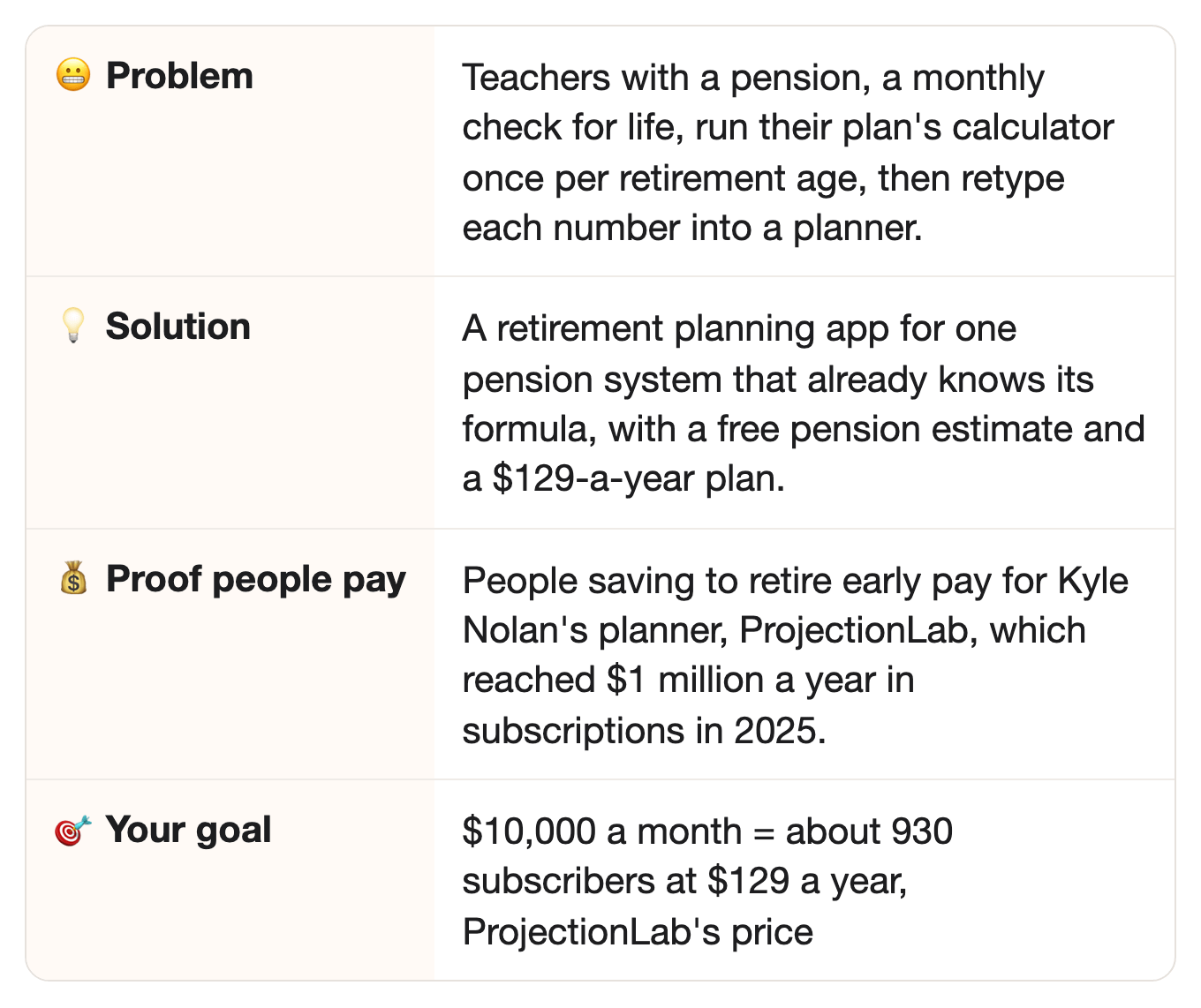
⚡ Quick facts
⠀
📖 How one engineer built a $1M-a-year planner after work
He wanted a better planner for his own life, so he built it.
Kyle Nolan was an engineer with a day job.
In 2021, he got inspired by the financial independence movement.
That’s people who save hard so they can stop working early.
But there was a problem.
In his words: “I couldn’t find the right tool, so I started building.”
He called it ProjectionLab.
And his schedule was brutal.
“4-6 hours every night after work, entire weekends, holidays, you name it.”
Oof.
⠀
In May 2021, his first paying users came from a post on Hacker News, a tech news site.
That brought in $150 a month in subscriptions.
Small, but it was a start.
By December 2021, it made $1,000 a month.
Then, in September 2022, Mr. Money Mustache, a well-known early-retirement blogger, mentioned it.
It reached $4,000 a month.
By June 2023, it made $10,000 a month.
That November, at $23,300 a month, he quit his day job, after 2.5 years of nights and weekends.
Finally.
⠀
He knew his weak spot.
In his words: “I was just an ordinary engineer with zero marketing experience.”
So he found a partner to handle growth and marketing, while he kept building.
In June 2025, ProjectionLab made $83,300 a month in subscriptions.
That’s $1 million a year, with no investors’ money.
He wrote that it has helped over 100,000 households plan their money.
Cha-ching! 💰
He went from a day job to a $1-million-a-year planner by building the tool he wanted for himself.
⠀
🔗 Same idea, new group
In the story: people saving to retire early paid for ProjectionLab, the planner Kyle Nolan built for his own life.
⠀In this idea: teachers, nurses, and other workers with a pension need a planner that already knows their plan’s formula.
⠀Why it carries over: both groups want to see when they can stop working, on one chart, without doing the math by hand.
⠀
💡 The opportunity
Planners like his are built for people whose retirement is their own savings. A teacher’s pension comes from a formula those planners don’t know.
First, how does a pension work?
Quick version: it pays a monthly check for life, worked out by a formula the plan sets.
California’s teachers’ plan, CalSTRS, writes its formula like this: “Service Credit x Age Factor x Final Compensation.”
Service credit is years worked.
For final compensation, CalSTRS uses a member’s best average pay over 36 months in a row, for newer members.
⠀
The age a member stops working changes everything.
The age factor is the percent of final pay earned for each year worked.
For newer CalSTRS members, the age factor is 1.16% at 55, 2% at 62, and 2.4% at 65.
Example: with 30 years of service credit, that’s 34.8% of final pay at 55, or 60% at 62.
So stopping a few years earlier can change the check a lot.
⠀
There are a lot of these people.
More than 37 million people were in state and local government pension plans in 2025.
That counts workers who’ve left but will still get a check later.
⠀
Here’s the simple part: the rules are public.
CalSTRS says its formula is “set by law.”
Big systems like CalSTRS publish their formula, their tables, and a member handbook.
⠀
But the rules change, and a retirement plan made with old rules gives the wrong numbers.
In January 2025, a new federal law ended two rules that had cut Social Security for people with some government pensions.
Wait, how does a pension cut Social Security?
Some government jobs don’t pay into Social Security, and those two rules had cut benefits for people with pensions from that work.
Those rules had reduced or wiped out the Social Security of over 2.8 million people, including some teachers, firefighters, and police officers.
⠀
👉 The idea: a planning app for one pension system that already knows its formula, and shows the pension, savings, and Social Security on one chart.
⠀
🙋 Never worked for the government? You can still build this.
Good news: you’ve got three ways in.
Let your AI read what members already ask.
Members post their questions in Facebook groups, union forums, and retiree groups for their system.
Part 0 of the prompt finds those groups, and your AI lists the questions that come up most.
⠀
Team up with someone who knows the plan.
A retired member, or a financial planner who charges a flat fee, reviews your rules and your first results.
You build the app and find the members.
⠀
Or start with the system you know.
Are you in one system yourself, or is your partner or a parent?
Then start there.
You already know someone who will test it for you.
⠀
✅ Why this could work
Why this one can work, in three points.
People already pay yearly for planners.
ProjectionLab’s Premium plan cost $129 a year in May 2026.
Boldin, another planner, raised its yearly price from $120 to $144 for new subscribers in July 2025.
⠀
Pensions aren’t disappearing.
CalSTRS was set up by law in 1913.
Yep, 1913.
It has 1 million members and beneficiaries: working and retired educators, plus family members who receive benefits.
⠀
Even a money news site says calculators skip the pension.
A May 2026 247 Wall St article describes a common case.
A teacher with a pension uses a calculator “that ignores the pension entirely.”
Oops.
⠀
👉 Don’t take my word for it. Every number is linked in “📎 The sources,” at the very end.
⠀
📊 More proof people want this
Want more? Here you go.
Advisors pay even more.
ProjectionLab also sells a $549 version for financial advisors, next to a free Basic plan.
⠀
The money in pensions is huge. 💰
State and local pension plans paid out $418.25 billion in benefits in 2025.
They held $6.49 trillion in assets that year.
⠀
One system is a big market on its own.
CalSTRS calls itself the largest educator-only pension fund in the world.
It covers California’s public school educators, from prekindergarten through community college.
⠀
The pension is only part of the plan.
CalSTRS says its pension replaces, on average, about 54% of a member’s salary.
So where does the rest come from?
Savings and Social Security.
⠀
When rules change, people need new math.
After the 2025 law, Social Security sent over 3.1 million payments, totaling $17 billion, by July 7, 2025.
Any plan made before the change needs a fresh look.
⠀
👉 Members get a pension estimate from their pension system and a planner from someone else, and must put the two together themselves.
⠀
🔍 Who’s already doing it
Big planners exist, and so do the pension systems’ own calculators. None does both.
ProjectionLab is built for people who save to retire early.
It grew out of “the financial independence movement,” in its founder’s words.
It has a pension switch: you type a percent of final pay, or an amount.
So you still have to know what to type.
But a pension member only gets that number by running the plan’s calculator, one retirement age at a time.
⠀
Boldin is a general planner.
Our view: it’s built for any retiree, not around one pension system’s rules.
⠀
Pension systems have their own calculators.
CalSTRS has a free retirement benefits calculator, and says its “Calculations are estimates only.”
It estimates the pension, not the savings and Social Security around it.
⠀
Small pension calculator apps exist too.
A FERS Calculator app for federal workers came out on the App Store in 2019.
FERS is the Federal Employees Retirement System, the pension plan for US federal workers.
It gives a rough pension estimate from age, years of service, and pay.
⠀
What’s missing in the tools above, in our view:
A planner built on one pension system’s own rules, that also puts the pension, savings, and Social Security on one chart.
With a “what if I retire at 60?” slider.
⠀
🔎 Check the market yourself in 2 minutes: run Part 0 of the prompt, under “📋 The prompt” below.
Your AI searches the app stores, planning sites, and member groups that day.
Then it tells you: early, growing, or crowded.
Early? Start now.
Crowded? Good news: it means members pay. Pick one narrower group, like members hired after a certain year, who all share one formula (Step 1 below).
A crowded market is still OK. You win by serving one system better, not by being first.
⠀
👉 That’s the part nobody else offers: one planner per pension system, with the rules already loaded and checked.
⠀
🤖 Why AI won’t replace it
Could ChatGPT just do this? Sort of. AI does retirement math well, if someone first gives it the plan’s formula, its tables, and the latest rule changes. Your app comes with all three already in it.
🔮 Honest note: an AI agent can read a pension handbook for its owner, if they ask it to.
So the math alone isn’t the product.
The product is one system’s rules, loaded once, checked against the official calculator, and kept current.
⠀
1. Checked twice.Your app’s pension estimates are tested against the system’s own calculator, case by case.
Every screen is also read for words that sound like advice.
Will a busy teacher run those checks herself?
Probably not.
⠀
2. Kept up to date.The 2025 law changed the math for millions of people with a pension.
Your app updates once, and every member’s plan updates with it.
⠀
3. Ready to use.Move one slider, from 58 to 62, and see the check change.
No handbook, no prompt to write.
⠀
4. The whole plan, saved.Members come back each year with a new pay stub and a new statement.
Their plan, their history, and their what-ifs are already there.
⠀
5. Proof people pay for planners: ProjectionLab charges $129 a year, even though CalSTRS gives its members a calculator for free.
⠀
👉 Members would pay for their plan’s rules already loaded and checked, not just for the math.
⠀
💵 How much you can make
Grab a calculator. Just kidding, here it is.
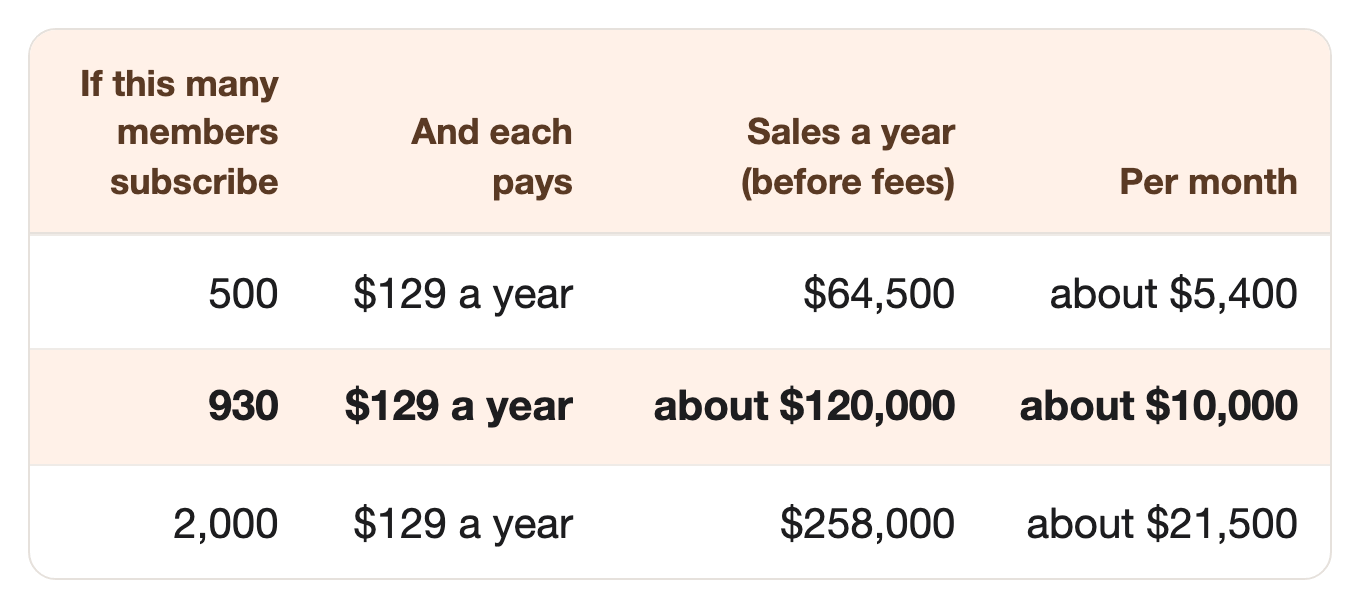
$129 a year is the price of ProjectionLab’s Premium plan.
⠀930 subscribers is under 0.1% of CalSTRS’s 1 million members and beneficiaries.
⠀And if it doesn’t work? Here’s all you lose:
Nothing for hosting, if you start on a free plan.
One month’s subscription to an AI app, like ChatGPT or Claude.
One week of your time.
⠀
Three systems at 930 subscribers each make about $360,000 a year, so three years add up to over $1 million.
⠀
👉 Run three of these well for three years, and the total could pass a million: no promises, just the numbers.
Is your brain already buzzing? 🐝
Then scroll on. The build plan is below. 👇
Not feeling it? All good. Another idea comes next week.
That’s it, my fellow contrarians! 🙌
Yours ‘finding you small niches with real money in them’ Vijay Peduru 🦸♂️
⠀
⠀
⠀
🧰 Want to build it? Here’s everything else.
In every step, AI does most of the work, while you pick the system and check every number. 🎙️
One rule above all: this is a planning tool, not financial advice.
It shows estimates and math.
It never tells anyone what to invest in, when to retire, or which payout option to pick.
A payout option is how a member takes the pension at retirement.
For example, a bigger check for themselves alone, or a smaller one that keeps paying a spouse.
⠀
Step 1: 🎯 Pick one pension system, and one tier
One system, not every pension.
Pick a system you know, or can reach.
A state teachers’ plan, a state employees’ plan, a big city’s plan, or the federal plan.
Then pick one tier inside it.
Most systems have different formulas for people hired in different years, like CalSTRS’s “2% at 60” and “2% at 62.”
The name tells you the rule: “2% at 62” means 2% of final pay for each year worked, if you stop at 62.
Find where its members meet. Union chapters, retired members’ groups, school staff rooms, and Facebook groups for that system.
Pick a name that’s yours. Never use the system’s name or logo as your app’s name, and say plainly you’re not part of it.
⠀
Step 2: 📚 Load the rules
The rules are the real product: the formula, the tables, and the fine print, all checked.
Collect the system’s own pages: the formula, the age-factor table, how final pay is worked out, and buying extra service credit.
Buying service credit means paying the system to add years to a member’s record, when its rules allow.
More years means a bigger check, so members want to test whether the cost is worth it.
Write down each rule with its source page and the date you read it.
That way, when a rule changes, you know which ones to re-check.
Turn the rules into a spreadsheet first. Test it by hand before any app exists.
Set a yearly reminder to re-read the rules, and watch the news for law changes.
⠀
Step 3: 🛠️ Build the app
You don’t need to code. AI coding tools build it from screens you describe.
Keep it tiny: three screens.
My pension: the member types numbers from their own yearly statement.
The whole plan: pension, savings, and a Social Security estimate the member copies from their own Social Security statement.
What if: a slider for the age they stop, and a switch for buying service credit.
Make it a web app, so members can use it on a laptop or phone.
Use an AI coding tool, like Claude Code or Cursor, and describe each screen in plain words.
⠀
Step 4: 🔍 Check every number
A wrong number hurts a real person’s plan, so every estimate gets tested before launch.
Your AI writes the test cases in Part 4 of the prompt, and checks the app’s words for advice in Part 5.
🧪 Test 20 made-up members.
Run each one in your app and in the system’s own calculator.
Every result must match, or you find out why.
Yes, all 20.
🛡️ The rules, built into the app:
Every number is an estimate, with the rule and the source page behind it.
Never recommend an investment, a product, a retirement date, or a payout option.
Every screen says: “This is a planning tool, not financial advice. Confirm with your pension system before you decide.”
Never ask for a Social Security number or a pension-account log-in, and never sell anyone’s data.
Optional: pay a flat-fee planner or a retired member once, to check your rules and your first 20 results.
Ask a lawyer whether your app’s features could count as giving advice where you live, before you launch.
⠀
👉 The prompt already follows these rules: estimates only, no advice, no product picks, no Social Security numbers, and the “planning tool” line on every screen.
⠀
Step 5: 🏪 Open for subscribers
Copy a price people already pay.
Free pension estimate, so members try it in two minutes.
Premium at $129 a year, like ProjectionLab’s Premium plan.
Premium adds the whole plan, the what-if slider, saved plans, and a yearly update when the rules change.
Let AI write your sales page, in the words members use, with the “planning tool, not financial advice” line.
⠀
Step 6: 📣 Get your first members
Go where members of your system already learn about retirement.
Put a free one-page estimate online.
Members enter their years, their age, and their pay, and see their age factor and estimated pension.
At the bottom: “See the whole plan, with savings and Social Security.”
Offer a free 20-minute talk at a local union chapter or a retired members’ group meeting.
A union chapter is the local branch of a teachers’ or workers’ union, and it holds regular meetings.
Show how the age you stop changes the check, with a made-up member on the screen.
Hand out a card with a free month of Premium at the end.
Three days before a free Premium month ends, offer two more weeks for an honest review.
Ask for an honest review, even if it isn’t a good one.
⠀
Step 7: 🏃 Eliminate competitors
When others copy you, here’s how you stay the one people pick.
Own one claim: “Built from your system’s own rules, and checked against its own calculator.”
Put it on your sales page, your free estimate, and every talk.
A general planner can’t say it about your system.
Put a real person on the reply line.
Every reply says “real person here,” with your name and photo.
Answer within a day, and never give personal advice in a reply.
⠀
Step 8: 🎲 Make it bigger
Every pension system has its own formula, and its members all ask: what will my check be, and when can I stop?
Add the next tier of the same system, on the same app.
Then open the next system, like the state employees’ plan next door, using the same code.
Each new system reuses the code, the tests, and the safety rules from your first one. 🎯
⠀
🗓️ Your first week
Phew. That was a lot. 😅
A first version of Steps 1 to 6 fits into seven days. 🚀
By day 7, you’ve picked your pension system.
You have its rules in a spreadsheet, a test app, a sales page, and a free estimate page.
Quick heads-up: the prompt below has eight Parts, Part 0 to Part 7, and they’re not the same as the Steps above.
Day 1 (Step 1): Run Part 0 and Part 1 of the prompt (it’s below), and pick your system and tier.
Day 2 (Step 2): Load the rules into a spreadsheet with Part 2.
Day 3 (Step 3): Plan the app’s three screens with Part 3, and build them.
Days 4–5 (Step 4): Test 20 made-up members with Part 4, then check every screen for advice with Part 5.
Day 6 (Step 5): Write your sales page with Part 6.
Day 7 (Step 6): Write your free estimate page, your talk, and your review request with Part 7.
⠀
🏄 How to use the prompt
One prompt does all the AI work, in eight parts: a quick market check (Part 0), then Parts 1 to 7.
Part 1 — Pick the system and tier. Compares three systems or tiers on size, reach, rules, and tools, then picks one.
Part 2 — Load the rules. Turns the system’s own pages into a rules list and a spreadsheet layout, each rule with its source.
Part 3 — Plan the app. Writes the three screens and the safety lines, ready for an AI coding tool.
Part 4 — Test 20 members. Makes 20 made-up members, then compares your app with the official calculator and finds what’s off.
Part 5 — Check for advice. Reads every screen like a strict compliance reviewer and like a confused member, and flags anything that sounds like advice.
Part 6 — Write the sales page. A headline, what’s free, what Premium adds, how it’s checked, the price, and the “planning tool” line.
Part 7 — Write the growth pieces. Your free estimate page, your 20-minute talk, and your review request.
Run it your way:
Part by part (the default): it pauses after each part, and you type “next” to go on.
All at once: say “run all eight parts.”
Just one part: say “only do Part 3,” or any part you need.
The full prompt is just below, under “📋 The prompt.”
🎙️ Talk to your AI sidekick, don’t type.
Turn on voice mode, or use a dictation app like Wispr Flow.
Say it messy. The AI sorts it out.
Turn it into a skill, so you never paste it again.
Paste the prompt into Claude or ChatGPT, and say: “Turn this into a skill I can save.”
Install once, use forever.
⠀
📋 The prompt
The prompt (copy it into Claude or ChatGPT, fill in the INPUTS part, and run it your way)
CONTEXT:
- You're my partner in building a small retirement planning app for members of one pension system (or one tier of it). It shows their estimated pension, savings, and Social Security on one chart, with a "what if I stop at a different age?" slider.
- This prompt has eight parts, Part 0 to Part 7, in order.
- Run it the way I ask:
    - If I say nothing, go one part at a time. After each part, show me the result, then stop and wait. Move on only when I type "next."
    - If I say "run all eight parts," do Part 0 to Part 7 without stopping.
    - If I say "only do Part 3" (or any part), do just that part.
- If a part needs something from me, ask for it before you start that part.
- RULES. Follow these in every part, and build them into everything you write:
    1. This is a planning tool, not financial advice. Show estimates and math only.
    2. Never recommend an investment, a financial product, a retirement date, or a payout option. Show the choices side by side, and let the member decide.
    3. Every number is an estimate. Show the rule and the source page behind it.
    4. Put this line on every screen and page: "This is a planning tool, not financial advice. Confirm with your pension system before you decide."
    5. Never ask for a Social Security number or a pension-account log-in. Members type numbers from their own statements.
    6. Never use the pension system's name or logo as the app's name, and never suggest the app is part of the system.
    7. Never sell or share user data.
- Never invent a fact, a rule, or a number. If you're not sure a rule is right, leave it out and tell me.
- Keep web search on for the whole prompt (turn on search in ChatGPT or Claude), so you can open any page you need to check.

=============== INPUTS — edit these, or just run as is ===============

The pension systems I'm thinking about:
{e.g. CalSTRS (California teachers), CalPERS (California state and local workers), the federal FERS plan}

Who I know in them (or leave blank):
{e.g. my wife has taught in California for 18 years and is under CalSTRS 2% at 60}

What members ask most (paste questions you've seen in member groups, or leave blank):
{e.g. "If I stop at 60 instead of 62, how much less do I get?", "Is buying service credit worth it?"}

My prices:
{e.g. free pension estimate; Premium at $129 a year}

======================== END OF INPUTS ========================

THE PARTS:

Part 0 — Check the market.
This part needs web search (turn on search in ChatGPT or Claude). For each system I listed, search and give the count, the three biggest with links, and their prices:
1. Apps on the App Store and Google Play that estimate this system's pension or plan retirement around it.
2. Websites, spreadsheets, and courses for this system's members.
3. The system's own calculators, and what they cover.
4. The biggest member groups, YouTube channels, and newsletters for it.
Then tell me: early (few tools), growing, or crowded, and which system or tier looks least served. Give a link for every number. If you can't open a page, say so. Never guess a number.

Part 1 — Pick the system and tier.
Compare three systems or tiers, using Part 0 and my INPUTS. For each: how many members it has (with a link), where its members meet, how clear its published rules are, and how well the tools in Part 0 cover it. Then pick one, and say why. Say clearly which reasons are your guess.

Part 2 — Load the rules.
For my system and tier, open the system's own pages and handbook, and list every rule the app needs:
1. The benefit formula, word for word.
2. The age-factor table (or whatever the system calls it), every row.
3. How final pay is worked out.
4. Rules for buying extra service credit, if any.
5. Yearly increases after retirement, if any.
6. The payout options, described plainly, with no advice on which to pick.
For each rule, give the source link and the exact words it comes from. Then give me a spreadsheet layout that does the formula, with 3 worked examples from the rules. Mark anything you couldn't confirm.

Part 3 — Plan the app.
Write a plan I can paste into an AI coding tool, like Claude Code or Cursor. Keep it to three screens:
1. My pension: the member types years of service, age, and pay from their own yearly statement. Show the estimated monthly pension and the rule behind it.
2. The whole plan: the pension, their savings, and a Social Security estimate they copy from their own Social Security statement, on one chart by year.
3. What if: a slider for the age they stop, and a switch for buying service credit, showing the change in the estimate.
Add a free tier (screen 1) and a Premium tier at my price (screens 2 and 3, saved plans). Put the RULES line on every screen. Say what data the app stores, and that it's never sold.

Part 4 — Test 20 members.
Help me test my app against the system's own calculator.
1. Make 20 made-up members who cover the edge cases: young and near retirement, part-time years, the earliest and latest retirement ages, buying service credit.
2. For each, list the inputs to type into both my app and the official calculator.
3. Wait while I run them, and paste the results back.
4. Compare each pair. Mark it match, close, or wrong, and for every gap, say which rule or input likely caused it and how to fix it.

Part 5 — Check for advice.
Now act as a strict compliance reviewer, then as a confused member who knows nothing about pensions. Read every screen and every line of text I paste. As the reviewer, flag anything that sounds like advice, a recommendation, a promise, or a missing "estimate" label, and quote the risky words. As the member, flag any word or number that would confuse them. Then give the fixed text, with every RULES line in place.

Part 6 — Write the sales page.
Ask me for three real screenshots or examples from my app first. Never invent a result, a review, or a number. Give me:
1. A headline that names the system and tier, not "retirement."
2. What's free and what Premium adds.
3. How the estimates are checked against the system's own calculator.
4. The price, shown up front, and "Cancel any time."
5. The RULES line, word for word.

Part 7 — Write the growth pieces.
Write three things:
1. A free one-page estimate: the inputs, the result with its rule, and a line at the bottom inviting members to see the whole plan.
2. An outline for a 20-minute talk at a union chapter or retired members' group: how the age you stop changes the check, shown with a made-up member, then a short app demo, then a card with a free month of Premium.
3. A short in-app message, sent three days before a free Premium month ends, offering two more weeks for an honest review. Ask for an honest review, never a good one.
Never promise results, never give advice, and never invent a number.
⠀
📎 The sources
Every number above, with where it came from.
ProjectionLab’s story and revenue · Number: “inspired by the financial independence movement”; “I couldn’t find the right tool, so I started building”; “4-6 hours every night after work, entire weekends, holidays, you name it”; $150 MRR May 2021 (”First internet dollar! (from a post to HN)”); $1K MRR Dec 2021; $4K MRR Sep 2022 (”Shoutout from Mr Money Mustache”); $10K MRR Jun 2023; $23.3K MRR Nov 2023 (”Quit my day job”); $83.3k MRR Jun 2025; “We bootstrapped ProjectionLab to $1,000,000 in annual recurring revenue”; “over 100,000 households”; “I was just an ordinary engineer with zero marketing experience”; a growth and marketing partner · Source: ProjectionLab blog, Kyle Nolan, June 30, 2025
Quitting the day job · Number: “After 2.5 years of bootstrapping ProjectionLab as a solo dev and side project on nights and weekends” · Source: ProjectionLab blog, November 13, 2023
ProjectionLab’s prices · Number: Basic $0 a year; Premium $129 a year; Pro (for advisors) $549 a year · Source: ProjectionLab pricing, Wayback copy, May 16, 2026
ProjectionLab’s pension switch · Number: “Has Defined Benefit Pension”; payout as “% of Final Pay”, “% of Career Average Pay”, or an amount · Source: ProjectionLab help, March 11, 2025
Boldin’s price · Number: New PlannerPlus subscriptions from $120 to $144 a year, starting July 14, 2025; “our first price update in more than two years” · Source: Boldin, June 19, 2025; Wayback copy, July 13, 2025
People in public pension plans · Number: “More than 37 million people” in state and local pension plans in 2025, including inactive members eligible for future benefits; $6.49 trillion in assets; $418.25 billion in benefit payments · Source: US Census Bureau, May 14, 2026
CalSTRS size and age · Number: “established by law in 1913”; “1 million members and beneficiaries”; “Largest educator-only pension fund in the world”; prekindergarten through community college · Source: CalSTRS at a glance, Wayback copy, February 4, 2026
CalSTRS formula · Number: “Service Credit x Age Factor x Final Compensation = Retirement Benefit”; “a formula set by law” · Source: CalSTRS retirement benefits, Wayback copy, June 24, 2026
CalSTRS age factors · Number: 2% at 62 members: 1.16% at 55, 2.00% at 62, 2.40% at 65 or later; 2% at 60 and 2% at 62 tiers. Example math: 30 × 1.16% = 34.8%; 30 × 2% = 60%; the site’s menu links a “Member Handbook” · Source: CalSTRS age factor, Wayback copy, February 4, 2026
Final pay · Number: 2% at 62 members: “highest average annual compensation earnable during any 36 consecutive months” · Source: CalSTRS final compensation, Wayback copy, February 4, 2026
Buying service credit · Number: Service credit “may also be purchased under certain circumstances” · Source: CalSTRS service credit, Wayback copy, February 4, 2026
CalSTRS calculators · Number: “Calculations are estimates only”; the benefit “will replace, on average, about 54% of your current salary” · Source: CalSTRS calculators, Wayback copy, June 13, 2026
The 2025 Social Security law · Number: Signed January 5, 2025; ended the Windfall Elimination Provision and Government Pension Offset, which “reduced or eliminated the Social Security benefits of over 2.8 million people”; includes some “teachers, firefighters, and police officers in many states”; “over 3.1 million payments, totaling $17 billion” as of July 7, 2025 · Source: Social Security Administration, last updated July 21, 2025; Wayback copy, January 1, 2026
A one-system calculator app · Number: “FERS Calculator”: federal FERS workers can “get a [rough] estimate of their retirement annuity” from “age, years of service and the high - 3 salary”; first released October 24, 2019 (App Store version history; Apple’s lookup API,
itunes.apple.com/lookup?id=1484437870, releaseDate). Search: App Store, “FERS retirement calculator” · Source: App Store, FERS CalculatorCalculators that skip the pension · Number: A teacher “plugs the numbers into a 4% rule calculator that ignores the pension entirely” · Source: 247 Wall St, May 24, 2026