


Hello contrarians,
Today’s idea is called The First-Project Template Shop.
Grab a pen. 🖊️
First, a template maker’s story. Then, the business you could build from it.
⠀
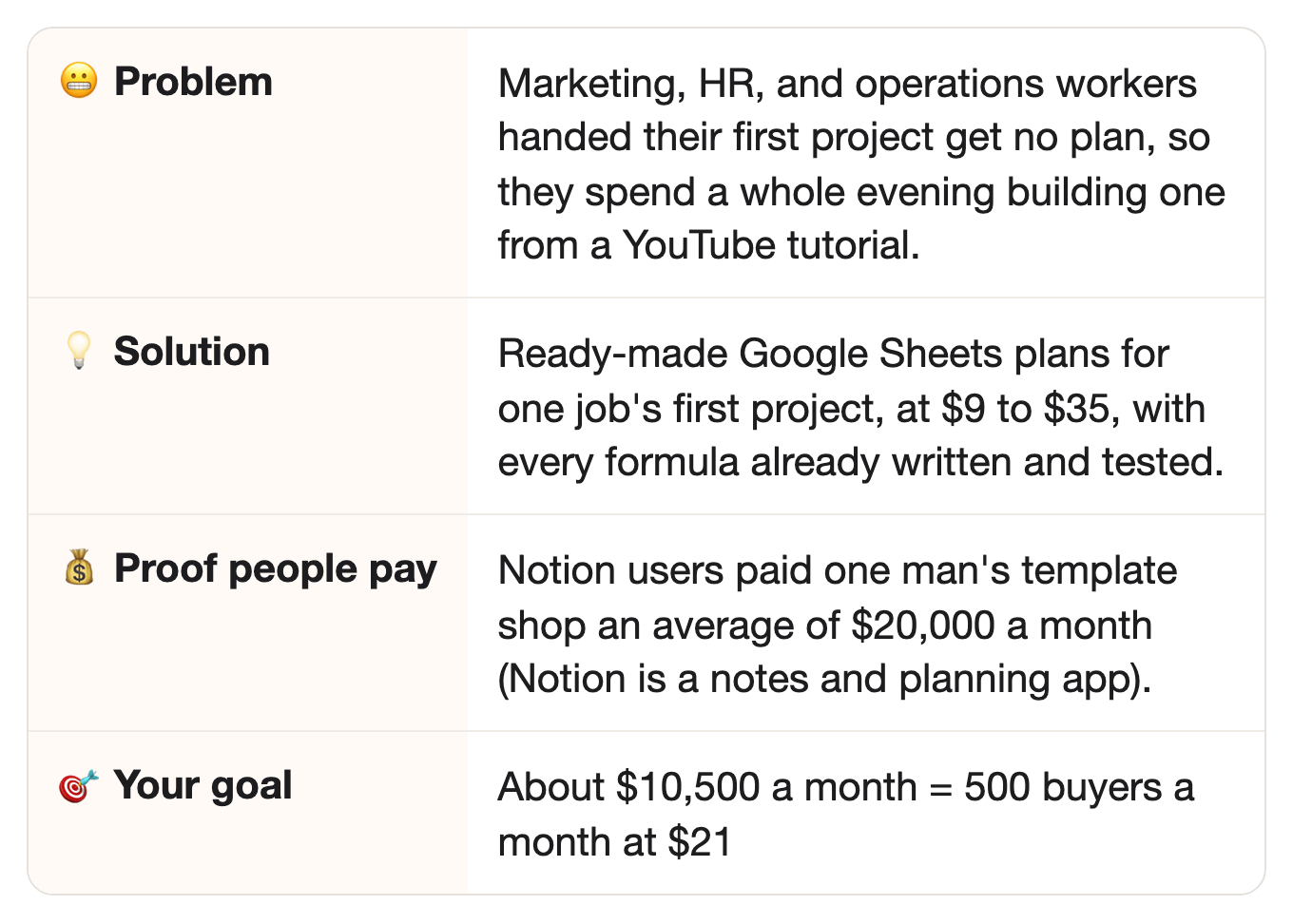
⚡ Quick facts
⠀
📖 How one man turned free templates into $20K a month
He started with only his weekends free.
Jason Chin is doing his military service, and he’s free only on weekends.
That’s not a lot of spare time.
He keeps seeing one piece of advice online: build an audience before you have anything to sell.
So he tries it, and posts on X about no-code tools, the apps that let you build things without writing code.
That leads him to rediscover Notion, an app people use to organize their notes, tasks, and projects.
He starts building templates: ready-made Notion pages that anyone can copy into their own account.
He calls his business Easlo.
⠀Who’d have thought: the free templates are what sold the paid ones.
Many of his templates are free, so strangers can try his work.
Then they upgrade to bigger templates with more pages.
Free first, paid second.
⠀
And his prices?
Free for the simple ones.
$5 to $9 for small trackers.
By September 2024, he tells Indie Hackers, a website for small online founders, that Easlo averages $20,000 a month.
And all of it from one-time payments.
Holy cow. 🐄
He went from free weekends during military service, to $20,000 a month, by giving away templates people copy in one click.
⠀
🔗 Same idea, new group
In the story: Notion users bought Jason Chin’s ready-made pages so they didn’t have to build their own from scratch.
⠀In this idea: people handed their first project at work need a ready-made plan in Google Sheets.
⠀Why it carries over: both groups would rather pay a few dollars for something finished than build it themselves from a blank page.
⠀
💡 The opportunity
Every year, people who aren’t project managers get handed a project, and they need a plan fast.
They work in marketing, HR, or operations.
Picture someone in marketing whose boss says: “You’re running this project.”
That’s who we mean.
They’ve never run one, and nobody hands them the tools.
⠀
They need a plan everyone on the team can see.
Who does what, and by when.
Sounds simple enough, on paper.
⠀
So they search for a Gantt chart in Google Sheets.
Wait, what’s a Gantt chart?
It’s the classic project plan: one row per task, with a bar showing when it starts and ends.
And Google Sheets is Google’s free spreadsheet app, which many offices already use.
⠀
They find a long tutorial, and follow it step by step.
One viewer of an Excel Gantt chart tutorial wrote that it took “about 4 hours.”
Oof.
That’s a whole evening, gone, before the project even starts.
⠀
Here’s the shortcut: a plan that’s already built, with a one-minute video showing how to fill it in.
⠀It’s Jason’s model, with a different tool and a different buyer.
Jason sells Notion templates, many of them for personal life.
This idea sells Google Sheets project plans to people at work.
⠀
👉 The idea: sell ready-made Google Sheets templates for people running their first project at work.
⠀
🧩 What you actually need
Good news: the list is short.
Comfort with Google Sheets at work.
You don’t need to be a formula whiz.
AI writes the formulas and tests them.
⠀
A clear picture of what a first project needs.
Who does what, and by when.
⠀
A one-minute video for each template.
It shows the buyer how to fill the template in.
One minute, not a whole course.
⠀
✅ Why this could work
Three signs the money is real.
Others already make money selling templates, again and again.
Jason’s Easlo, from the story, made about $20,000 a month in 2024.
HeyMorning, an Etsy shop of spreadsheet templates, showed 63,200 sales in two and a half years, when we checked.
Yep, spreadsheets.
Data Bloo sells report templates for Google’s free reporting tool, Looker Studio.
Its revenue since 2021, verified through Stripe (the payment company), was $657,969 when we checked.
⠀
People have paid for spreadsheet help for more than 20 years.
Vertex42, a spreadsheet template website, has made templates for more than 20 years.
It counts 80 million template downloads.
Then there’s Kat Norton, who teaches Excel on TikTok.
Yes, Excel, on TikTok.
In 2022, she wrote for CNBC that her business makes “more than $2 million a year.”
That money comes from her Excel courses and training, not templates, but it shows people pay for help with spreadsheets.
⠀
People are already searching for ready-made project plans.
Hang on, the numbers are in the next section.
⠀
👉 Want to check these numbers? Each one has a source link in the last section, “📎 The sources.”
⠀
📊 More proof people want this
Want more? Here you go.
People already pay for project templates.
David McLachlan makes YouTube tutorials on project plans.
His pack of 50+ project templates in Excel and PowerPoint costs $21 on Etsy, with 552 reviews.
Vertex42 sells a Gantt chart template for $35, with a Google Sheets version included.
⠀
Millions of views on YouTube tutorials.
The top 200 YouTube results for “gantt chart google sheets” have more than 26 million views.
28 of those videos have over 100,000 views each.
Excel tutorials show up in those results too, so this counts spreadsheet Gantt charts in general.
Vertex42’s Excel Gantt chart tutorial has more than 4.2 million views.
That’s a lot of views for one kind of chart.
⠀
People search Google for the finished file, not the lesson.
“google sheets template gantt chart” gets 2,400 searches a month (US).
“google sheets template project management” gets 1,900.
“google sheets course” gets only 480.
See the gap?
Far more searches for the ready-made file than for a course.
⠀
The big picture: the world needs 25 million new project professionals by 2030. 💰
That’s from PMI, the project managers’ association, in a 2021 report.
About 2.3 million people a year need to join project work just to keep up.
PMI says the openings are for project managers and all changemakers, “regardless of their role.” 🔁
⠀
What one tutorial viewer says:
“Oh my god, I spent 5 hours to make this following the tutorial.”
That’s a comment under a popular YouTube tutorial for an Excel project dashboard.
Five hours.
Ouch.
⠀
And another:
“My marketing manager told me that I’m an excel guru after creating this gantt chart.”
That’s a comment under David McLachlan’s Excel Gantt chart tutorial.
Ha, called an “excel guru” for one chart.
⠀
👉 Every year, a new crowd gets handed a project, and they’re already searching for a ready-made plan.
⠀
🔍 Who’s already doing it
Here’s who already sells templates, and what they leave out.
Easlo, Jason’s business from the story above, sells Notion templates.
Notion is a notes and planning app, and many of his templates are for personal life.
Think second brains (one place for all your notes and ideas), finance trackers, and habit trackers.
Google Sheets project plans for work aren’t his focus.
⠀
Vertex42, a spreadsheet template site, sells to everyone.
It has more than 450 templates, from budgets to calendars.
That’s a big library.
But a big library for everyone isn’t made for one person’s first project.
⠀
When we checked, Etsy’s top results were all-in-one dashboards.
Etsy is a website where small shops sell handmade goods and digital files.
Most packed a Gantt chart (a timeline with one bar per task), a task board, and a to-do list into one file, for small businesses.
Prices ran from $2.49 to $26.60.
Handy for a small business owner, but not built for someone’s first project at work.
⠀
The biggest free teachers mostly sell Excel.
David McLachlan’s YouTube channel has about 240,000 subscribers.
His $21 pack is Excel and PowerPoint, not Google Sheets.
⠀
What nobody was selling, when we checked:
Templates built for one job’s first project, like a marketer’s first product launch.
Google Sheets first, with an Excel version too.
A one-minute video for each template.
⠀
🔎 Check the market yourself in 2 minutes: run Part 0 of the prompt in the build plan below.
Your AI searches Etsy, Gumroad (a site for selling digital files), YouTube, and Google that day, and tells you: early, growing, or crowded.
Early? Start now.
Crowded? Good news: it means people buy. Pick one narrower job title (Step 1 of the build plan).
A crowded market is still OK. You win by serving one group better, not by being first.
⠀
👉 That missing part can be your business: Google Sheets templates for one job’s first project, each with a one-minute video.
⠀
🤖 Why AI won’t replace it
AI can write a formula. You hand them a finished plan that works the first time.
So, could ChatGPT just do this?
Sort of… if someone tells it exactly what to build, and asks it to test the result.
🔮 Honest note: AI tools can already build a basic project plan in a minute.
So a blank template isn’t the product.
The product is a plan with the right columns already picked, and every formula already tested.
⠀
1. Every template is tested twice.One AI builds it, then another AI attacks it, looking for mistakes.
ChatGPT can test a formula if you ask it to, but a busy lead just pastes it in, and a broken date reaches the boss.
Not a fun meeting.
⠀
2. You pick what to track.A first-time project lead doesn’t know what to track.
You pick the columns that matter, like owner, due date, and status, and leave out the rest.
⠀
3. Ready to use: one click, and it’s theirs.ChatGPT could build a filled-in sheet, given the columns and sample data, but most people just ask for one formula.
Your template comes filled with example data, plus a “how to use this” tab.
⠀
4. Proof people pay for the finished file: Vertex42 sells its Gantt chart template for $35.People buy it even though Vertex42 has a free Gantt chart on the same site.
Free one right there, and they still pay.
⠀
👉 Anyone can get a formula for free.
What a busy first-time project lead pays for is the finished plan, tested and ready to fill in.
⠀
💵 How much you can make
Quick math time. 🧮
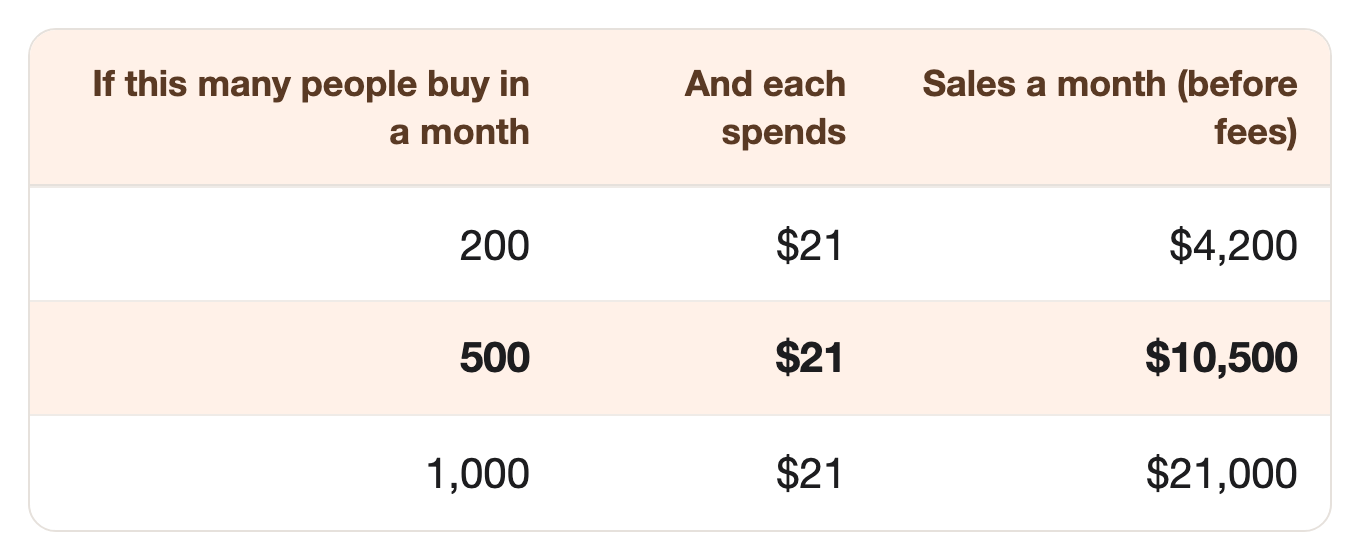
$21 is what David McLachlan charges for his project template pack.
So the price isn’t a guess.
⠀
500 buyers a month is about 17 a day.
Is that a lot?
For comparison, HeyMorning’s pace works out to about 2,100 sales a month (our math: 63,200 sales over 30 months).
⠀
And if it doesn’t work, here’s everything you lose:
About $0.60 to list three templates on Etsy, at $0.20 each.
One month’s subscription to an AI app, like ChatGPT or Claude.
One week of your time.
That’s the whole list.
⠀
👉 With AI doing most of the work, three or four ideas like this could add up to a million in 2 to 3 years.
This template shop could be your first idea, and each idea you add after it can grow your yearly income from there.
Already picturing your first sale?
Keep going. The how-to is just below. 👇
Not this one? Next week brings a new one.
That’s it, my fellow contrarians! 🙌
Yours ‘finding you small niches with real money in them’ Vijay Peduru 🦸♂️
⠀
⠀
⠀
🧰 Want to build it? Here’s everything else.
⠀
Step 1: 🧭 Pick one job and one first project
You don’t need to serve everyone. Start with one job and one project.
Pick a job title you know, or one you can interview.
A marketer running a first product launch.
An office manager running a first office move.
An HR person running a first hiring push.
List what that person has to track.
Tasks, owners, and due dates.
A weekly update for the boss.
Budget and risks, if the project has them.
Pick your first three templates.
For example: a project plan with a Gantt chart, a task tracker, and a weekly update log.
Three is plenty to start.
⠀
Step 2: 🛠️ Build the templates
You don’t need to write formulas. AI writes them, and you describe what you want.
Build in Google Sheets first.
Every template gets example data, so buyers see it working.
Every template gets a “how to use this” tab.
Then make an Excel version of each one.
Keep it simple. A first-time project lead wants five columns that work, not fifty.
Fifty columns is like a long instruction book, not a plan.
⠀
Step 3: 🔍 Check every template
Your name is on every file, so each one gets checked three times.
Your AI does the first two passes for you: it builds in Part 2, and tries to break it in Part 3 of the prompt.
🖊️ The AI builder. One AI pass builds the template and fills it with example data.
💥 The AI breaker. A second pass tries to break it: empty cells, dates in the wrong order, 500 tasks instead of 10.
🧐 You. You use it for one real week of your own work.
If it annoys you, it’ll annoy them.
⠀
👉 The prompt already follows three safety rules: build from scratch, test before selling, and use your own shop name, not Google’s or Microsoft’s.
⠀
Step 4: 🏪 Open your shop
Price them like the shops that already sell.
Set your prices.
$9 for one template, like Easlo’s small trackers.
$21 for a kit of three, like David McLachlan’s pack.
$35 for everything, like Vertex42’s Gantt chart template.
Pick where to sell.
Etsy is where HeyMorning and David McLachlan sell.
Gumroad or your own website work too.
Deliver Google Sheets as a “make a copy” link, inside a short PDF.
Excel buyers get the file.
Write your listings using the words people actually search for, like “google sheets template gantt chart.”
⠀
Step 5: 📣 Get your first buyers
Templates get shared around at work, so make every shared copy lead back to you.
Put one free project plan in a public template gallery, with your shop’s name in the sheet.
Pick a gallery where people already search for spreadsheet templates.
Its search sends people to you, and the sheet points them to the full kit.
Write one short page per search, like “event project plan template Google Sheets.”
Use the exact words people type as the title, and show the template working on that page.
Part 5 of the prompt writes these pages for you.
Add a small “Plan made with [shop name]” line at the bottom of every template.
Each time a buyer shares the plan with their boss or team, your name goes with it.
Keep it small, and let buyers delete it if they want.
⠀
Step 6: 🏃 Eliminate competitors
If ten competitors copy you, here’s how yours stays ahead.
Title each template with your buyers’ own words, like “my boss just gave me my first project.”
Copy phrases from the reviews, messages, and questions buyers send you.
A rival selling a “project management template” sounds like every other shop.
When you add features, raise the price openly and say what’s new.
Tell buyers what you added, like a budget tab, and why the price went up.
Never strip columns out to keep the old price.
⠀
Step 7: 🎲 Make it bigger
Every “first time” at work needs its own plan.
Open the same shop for other first-time moments:
The first team budget.
The first company event.
Three shops at about $10,000 a month each is about $360,000 a year, before fees. 🎯
⠀
🗓️ Your first week
Phew, that was a lot. 😅
Steps 1 to 5 fit into seven days. 🚀
By day 7, you have a shop, three templates, and three search pages.
Quick heads-up: the prompt below has five Parts, and they’re not the same as the Steps above.
Day 1 (Step 1): Run Part 0 of the prompt (it’s below) to pick your job, then Part 1 to pick your three templates.
Days 2–3 (Steps 2 and 3): Build the three templates with Part 2, then break each one with Part 3.
Day 4 (Step 4): Write your listings with Part 4, and open your shop.
Days 5–7 (Step 5): Write the search pages with Part 5, and post one for each template.
Then put your free plan in a template gallery.
⠀
🏄 How to use the prompt
One prompt does all the AI work, in five parts, plus a quick market check (Part 0).
Part 1 — Plan the shop. Lists what your buyer tracks in a first project, and picks your first three templates.
Part 2 — Build a template. Builds one Google Sheets template with formulas, example data, and a how-to tab, then the Excel version.
Part 3 — Break it. Tries every odd input it can think of, and fixes anything that breaks.
Part 4 — Write the listings. Writes your shop listings, using the words people actually search for.
Part 5 — Write the search pages. Writes one short page for each search people type, plus the “made with” line for your templates.
Run it your way:
Part by part (the default): it pauses after each part, and you type “next” to go on.
All at once: say “run all five parts.”
Just one part: say “only do Part 3,” or any part you need.
The full prompt is just below, under “📋 The prompt.”
🎙️ Talk to your AI sidekick, don’t type.
Turn on voice mode, or use a dictation app like Wispr Flow.
Say it messy. The AI sorts it out.
Turn it into a skill, so you never paste it again.
Paste the prompt into Claude or ChatGPT, and say: “Turn this into a skill I can save.”
Install once, use forever.
⠀
📋 The prompt
The prompt (copy it into Claude or ChatGPT, fill in the INPUTS part, and run it your way)
CONTEXT:
- You're my template partner. Together we'll build a small shop of ready-made Google Sheets project templates, with Excel versions, for people running their first project at work.
- This prompt has five parts, in order.
- Run it the way I ask:
    - If I say nothing, go one part at a time. After each part, show me the result, then stop and wait. Move on only when I type "next."
    - If I say "run all five parts," do them all without stopping.
    - If I say "only do Part 3" (or any part), do just that part.
- If a part needs something from me, ask for it before you start that part.
- Build every template from scratch. Never copy someone else's template.
- Never invent a number about the market. If you can't find a source, say so.
- Keep web search on for the whole prompt (turn on search in ChatGPT or Claude), so you can open any page you need to check.

=============== INPUTS — edit these, or just run as is ===============

The job title I'm serving:
{e.g. a marketer at a small company}

Their first project:
{e.g. running their first product launch}

What I already know about it (optional):
{e.g. I ran two launches at my last job; we tracked tasks, owners, dates, and a weekly update}

My prices:
{e.g. $9 a template, $21 for a kit of three, $35 for everything}

======================== END OF INPUTS ========================

THE PARTS:

Part 0 — Check the market today.
This part needs web search (turn on search in ChatGPT or Claude). Search for ready-made project templates for my job title and project and, for each place, give the count, the three biggest with links, and their prices:
1. Etsy shops selling Google Sheets or Excel project templates for this job or project.
2. Gumroad and other template shops.
3. YouTube tutorials teaching people to build this kind of plan.
4. Free templates from software companies.
Then tell me: early (few sellers), growing, or crowded, and which job title or project looks least served. Give a link for every number. If you can't open a page, say so. Never guess a number.

Part 1 — Plan the shop.
For my job title and first project:
1. List the ten things this person has to track, in their own words.
2. Turn those into ten template ideas, one job per template.
3. Pick the first three to build, and say why. Say clearly which reasons are your guess.

Part 2 — Build a template.
Ask me which template to build first. Then build it for Google Sheets:
1. Each tab, with its name and what it's for.
2. Each column, with its header and what goes in it.
3. Every formula, written out exactly, with the cell it goes in.
4. Ten rows of realistic example data.
5. A "How to use this" tab, in five short steps, for someone who's never run a project.
If you can create files, give me a ready Excel file too. If not, list what changes for the Excel version.

Part 3 — Break it.
Now act as a separate tester who didn't build this template. Try to break it:
1. Empty cells, text in date columns, and end dates before start dates.
2. 500 tasks instead of 10, and tasks that run across a new year.
3. Someone deleting a row, or sorting the sheet.
For each problem, say what happens and give the fix. Then give the final, fixed template.

Part 4 — Write the listings.
Write shop listings for Etsy, Gumroad, or my own site, using the words people actually search for, like "google sheets template gantt chart." Give a title, a short description, and tags for each template, plus a kit listing that shows how much buyers save. Say it works in Google Sheets and Excel. Never use Google's or Microsoft's names or logos as my shop name.

Part 5 — Write the search pages.
1. List five searches someone just handed a project would type for the final template, like "event project plan template google sheets."
2. For each search, write one short page, under 300 words. Use the search words as the title. Show the template working in three short steps, with one quick tip.
3. End each page with one line: "The template is in my shop. It's [its price from my INPUTS]."
4. Write a one-line footer for the template: "Plan made with [my shop name]," with my shop's link.

When all five parts are done, ask if I want to repeat Parts 2 to 5 for the next template.
⠀
📎 The sources
Every number above, with where it came from.
Easlo’s revenue · Number: “Easlo generates an average monthly revenue of $20k from one-time payments” · Source: Indie Hackers, September 19, 2024 (read through the Web Archive copy)
Jason’s start · Number: Military service, weekends only; posted on X; free templates first · Source: Same article
The advice, and the road back to Notion · Number: “Build in public and create an audience before having something to sell” · “it led me to rediscover Notion” · Source: Indie Hackers, September 19, 2024 (read through the Web Archive copy)
Easlo’s prices · Number: Free; $5 and $9 small templates; $39 and $79 systems · Source: Easlo templates
HeyMorning · Number: 63.2k sales; 2.5 years on Etsy; 133 templates · Source: Etsy: HeyMorning, read in a browser
HeyMorning’s pace · Number: About 2,100 sales a month · Source: 63,200 sales over 30 months, our math
Data Bloo · Number: $657,969 all-time revenue, verified with Stripe; founded October 2021 · Source: TrustMRR
Vertex42 · Number: “more than 2 decades”; over 450 templates; 80 million template downloads · Source: Vertex42 about page
Vertex42’s Gantt chart template · Number: $35, includes a Google Sheets version; a free Gantt chart on the same site · Source: Vertex42: Gantt Chart Template Pro
Kat Norton · Number: “more than $2 million a year,” from Excel courses and training, not templates (her own essay) · Source: CNBC, December 26, 2022
David McLachlan’s pack · Number: $21; 552 reviews; shop 14.6k sales · Source: Etsy listing, read in a browser
David McLachlan’s channel · Number: About 240,000 subscribers · Source: YouTube Data API (channel of video tuQpGzL_14g)
YouTube videos · Number: YouTube search “gantt chart google sheets”, top 200 results (US, English, not hand-filtered; Excel videos show up too): more than 26.8 million views; 28 with 100,000+ views · Source: YouTube Data API
Vertex42’s tutorial · Number: “How to Make a Gantt Chart in Excel,” more than 4.2 million views · Source: YouTube
Google searches · Number: “google sheets template gantt chart” 2,400; “google sheets template project management” 1,900; “google sheets course” 480, a month · Source: Ubersuggest, US
Project workers worldwide · Number: 25 million new project professionals needed by 2030; 2.3 million a year; “project managers and all changemakers,” “regardless of their role” · Source: PMI, Talent Gap report, 2021
Etsy’s top results · Number: All-in-one project dashboards, $2.49 to $26.60 · Source: Etsy search “google sheets project management template,” read in a browser
Comment: about 4 hours · Number: “It took me about 4 hours, but I’m thrilled with the result” (under David McLachlan’s Excel Gantt chart tutorial) · Source: YouTube comment, 2024
Comment: 5 hours · Number: “Oh my god, I spent 5 hours to make this following the tutorial.” (under MyOnlineTrainingHub’s Excel project dashboard tutorial) · Source: YouTube comment, 2020
Comment: excel guru · Number: “My marketing manager told me that I’m an excel guru after creating this gantt chart.” (under David McLachlan’s Excel Gantt chart tutorial) · Source: YouTube comment, 2025
Etsy listing fee · Number: $0.20 per listing; 6.5% transaction fee · Source: Checkout Page, 2026 Etsy fees guide