


Hello contrarians,
Today’s idea is called The Family Day Planner for Parents with ADHD.
Get comfy. 🛋️
First, two design students’ story. Then, the business you could build from it.
⠀
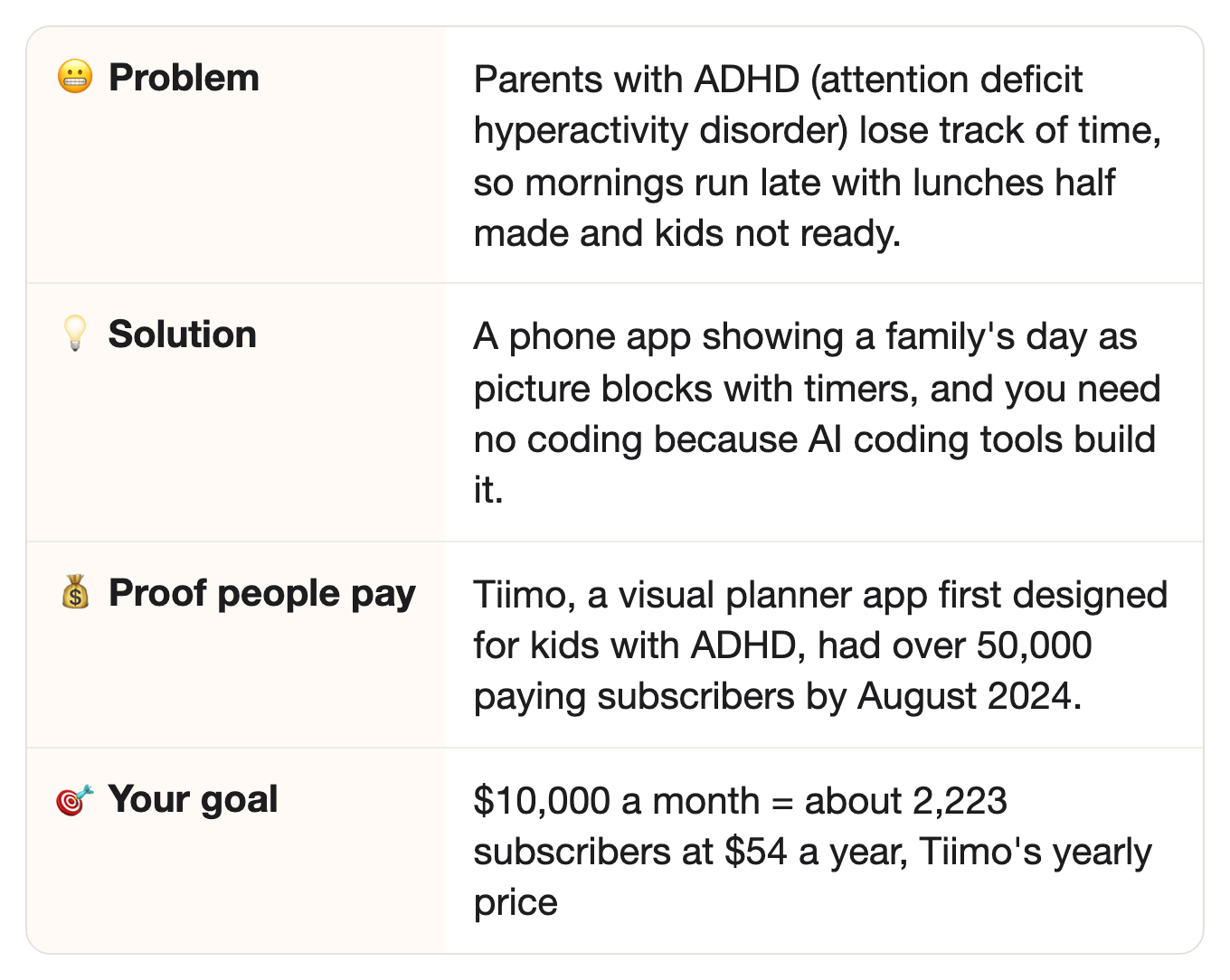
⚡ Quick facts
⠀
📖 How a school project became a planner with 50,000 paying subscribers
It all started as a school project about kids with ADHD.
Helene Lassen Nørlem and Melissa Azari studied digital design at the IT University of Copenhagen.
For their master’s thesis, they designed a tool to make daily life easier for children with ADHD.
Along the way, they interviewed families.
And many parents were “pretty hooked,” Helene told the university in 2016 (in Danish; our translation).
They handed in the thesis in September 2014.
Most school projects end right there.
This one didn’t.
⠀
Real life: both took full-time jobs right after school.
So they built the app in the evenings.
Yep, after a full day at work.
The first version ran on a smartwatch.
It counted down to the next thing on the child’s day, so the child didn’t need a grown-up to remind them.
Then Melissa saw something bigger: a child’s ADHD weighs on the whole family, not just the child.
The parent of a child with ADHD often ends up “the one who scolds,” she said.
Ouch.
But one test family said they got a happier daughter and a calmer home.
⠀
They named it Tiimo, and founded the company in 2015.
And Melissa has ADHD herself.
In 2020, they raised money from a crowd of investors, hoping to reach 10,000 subscribers.
So did they get there?
By August 2024, Tiimo had over 50,000 paying subscribers, and more than 500,000 free users.
More than 3 out of 4 of the paying subscribers called themselves neurodivergent (people whose brains work differently, like with ADHD or autism).
And in 2025, Apple named Tiimo its iPhone App of the Year.
Holy cow. 🐄
At $54 a year each, 50,000 subscribers would come to about $2.7 million a year (our rough math, not Tiimo’s number).
From a school project… to 50,000 paying subscribers, with an app that shows the day as picture blocks and countdowns.
⠀
🔗 Same idea, new group
In the story: over 50,000 people, most of them neurodivergent, paid Tiimo to see their own day as picture blocks with countdowns.
⠀In this idea: parents with ADHD need that same picture-and-timer day, but for the whole family at once.
⠀Why it carries over: a block that shrinks as the minutes pass helps anyone who loses track of time, adult or kid.
⠀
💡 The opportunity
Tiimo plans one person’s day. A parent with ADHD runs everyone’s.
Tiimo started with kids, but the app it grew into is set up for one person planning their own day.
The whole family, which Melissa saw ADHD weighs on, is the part Tiimo left out.
First, who are the buyers?
Adults with ADHD who are raising kids.
How many adults have ADHD?
About 15.5 million US adults had an ADHD diagnosis in 2023, the CDC (the US government’s public health agency) found.
And more than half got that diagnosis as adults.
⠀
Their day isn’t one person’s day.
Drop-off at 8:10, a packed lunch, soccer at 4, dinner, baths, bed.
Every block belongs to someone else too.
Busy, busy.
⠀
The big planner is built for one person alone.
When a tech writer set Tiimo up, it filled his first day with coffee, starting work, dinner, and TV.
Sounds lovely, right?
It is, for one adult, but not for a family rushing out the door at 7:40 a.m.
⠀
Here’s the relief: a picture of the day, with a timer on every block, that the whole family can see.
The parent sees what’s next, and how many minutes are left.
A clock only shows the time. A block that shrinks as the minutes pass shows how much is left.
The kids see it too, so the parent doesn’t have to call out the time all morning.
AI breaks “get out the door” into small steps, using what the app already knows about the family.
⠀
One rule this app always keeps.
It’s an organizing tool, not treatment.
It never gives medical advice, and never says anything about medicine.
⠀
👉 The idea: a visual day planner for parents with ADHD, with the family’s routines as picture blocks, timers, and small steps.
⠀
🙋 Never parented with ADHD? You can still build this.
Team up with a parent who has ADHD.
They shape the routines and test every screen, and you build the app and find the parents.
Pay them, or give them a share of the subscriptions.
⠀
Let your AI read what parents already post.
Parents with ADHD already describe their mornings in YouTube comments, podcasts, and parent forums.
Ask your AI to read a few hundred of them.
Then it tells you which part of the day falls apart, what they’ve tried, and what they wish they could see at a glance.
⠀
Or pick a kind of busy family you know from your own life.
Shift-working parents and single parents juggle the same school runs, and the same app works for them.
⠀
🗣️ What it looks like
Here’s a made-up example from one morning.
At 7:30, the phone shows one block: “Breakfast,” with 15 minutes on the timer.
Next up: “Shoes and bags,” with a picture of a backpack.
⠀
She taps “Pack lunches,” and the app splits it into four small steps.
It already knows Maya hates crusts and Leo needs a nut-free snack.
Nobody has to explain that again.
⠀
At 8:05, the lock screen says “Leave in 5 minutes.”
The kids can see the same countdown on the phone, propped up on the counter.
⠀
👉 The whole family sees what’s next, so Mom doesn’t have to be the alarm clock.
⠀
✅ Why this could work
Three signs the money is real.
Family organizing apps are worth buying.
OurFamilyWizard is a co-parenting app for families living apart, founded in 2001.
In 2022, it bought Cozi, a family organizing app with more than 20 million registered users.
So one company paid to own another family organizer.
That tells you apps that run a family’s day have real value.
⠀
The need isn’t going away.
ADDitude, a magazine on ADHD, was launched in 1998 by Ellen Kingsley.
She was a mother who left a 20-year TV career when her son was diagnosed with ADHD.
She wanted practical help for families, and families still read it.
⠀
Tiimo went past its own goal, five times over.
In 2020, it hoped for 10,000 subscribers.
By 2024, it had more than 50,000 paying ones.
⠀
👉 Like to check the numbers yourself? The links are all in “📎 The sources,” at the very end.
⠀
📊 More proof people want this
Want more? Here you go.
People already pay for a visual planner.
Tiimo cost $12 a month or $54 a year in its iPhone app, a tech writer found in 2025.
It had over 50,000 paying subscribers in 2024.
⠀
What a parent says, on the way to daycare.
“Watching this as I’m running late to drop my kids off at daycare I have to be at work in 30 minutes and nobody’s even dressed.”
Oof.
That’s a comment from January 2026, under a video on ADHD and motherhood from Understood, a YouTube channel about ADHD.
⠀
What a parent teaching their own son says.
“This season of life is so very hard and i often feel like i cant keep up.”
That’s a comment from September 2023, from a parent with ADHD teaching their son at home, with two more small kids.
⠀
What a parent of several kids says.
“The REAL challenge is when you have multiple kids with ADHD who you’re also trying to support… on top of your own.”
That’s a comment from November 2023, under a popular video on ADHD routines.
⠀
👉 People already pay for a planner that shows time, and parents with ADHD say the family’s routines are the hard part.
⠀
🔍 Who’s already doing it
A few big names, and a clear gap next to them.
Tiimo plans one person’s day.
It’s a visual planner with timers, built for people whose brains work differently.
Its first day is set up for one adult, not a family.
Sure, a parent could type the kids’ events in by hand.
Your app starts from the family: each kid’s times are saved once, and the kids can see their own blocks.
⠀
Cozi is a family calendar.
It has a shared calendar, shopping lists, and meal plans.
But it isn’t a picture-by-picture day with a timer on every block.
⠀
OurFamilyWizard is for co-parents.
It handles schedules and messages for parents who live apart.
⠀
Still missing when we checked:
A visual day built for a parent with ADHD and their kids, with the family’s routines, timers, and small steps.
⠀
🔎 Check the market yourself in 2 minutes: run Part 0 of the prompt, under “📋 The prompt” below.
Your AI searches the app stores, online courses, and YouTube that day, and tells you: early, growing, or crowded.
Early? Start now.
Crowded? Good news: it means parents pay. Pick one narrower group of parents (Step 1 below).
A crowded market is still OK. You win by serving one group better, not by being first.
⠀
👉 That missing part can be your business: a visual day made for a parent with ADHD and their kids.
⠀
🤖 Why AI won’t replace it
Could ChatGPT just do this? Sort of… if someone tells it the kids, the times, and what usually goes wrong. Your app keeps all of that, so the parent never types it again.
🔮 Honest note: an AI chat app, like ChatGPT or Claude, can plan one morning, if a parent types in every detail.
So a plan on its own isn’t the product.
The product is the family’s routines, saved once, shown as pictures and timers every day.
⠀
1. The family’s details, typed in once.A good plan needs each kid’s name, school times, activities, and the usual snags.
A parent at 7:40 a.m. won’t type that into a chat.
Your app asks once, and remembers.
⠀
2. Ready to use.The countdown sits on the lock screen, with no prompt to write.
⠀
3. The kids can see it too.A chat answer is words to read.
Your picture blocks work for a seven-year-old who can’t read a clock.
⠀
4. Remember Tiimo’s subscribers? It had over 50,000 paying subscribers in 2024.AI chat apps are free to try, and people still paid for a planner that shows time.
⠀
👉 They pay for a day shown as pictures and timers, not just a list of steps.
⠀
💵 How much you can make
Quick math time. 🧮
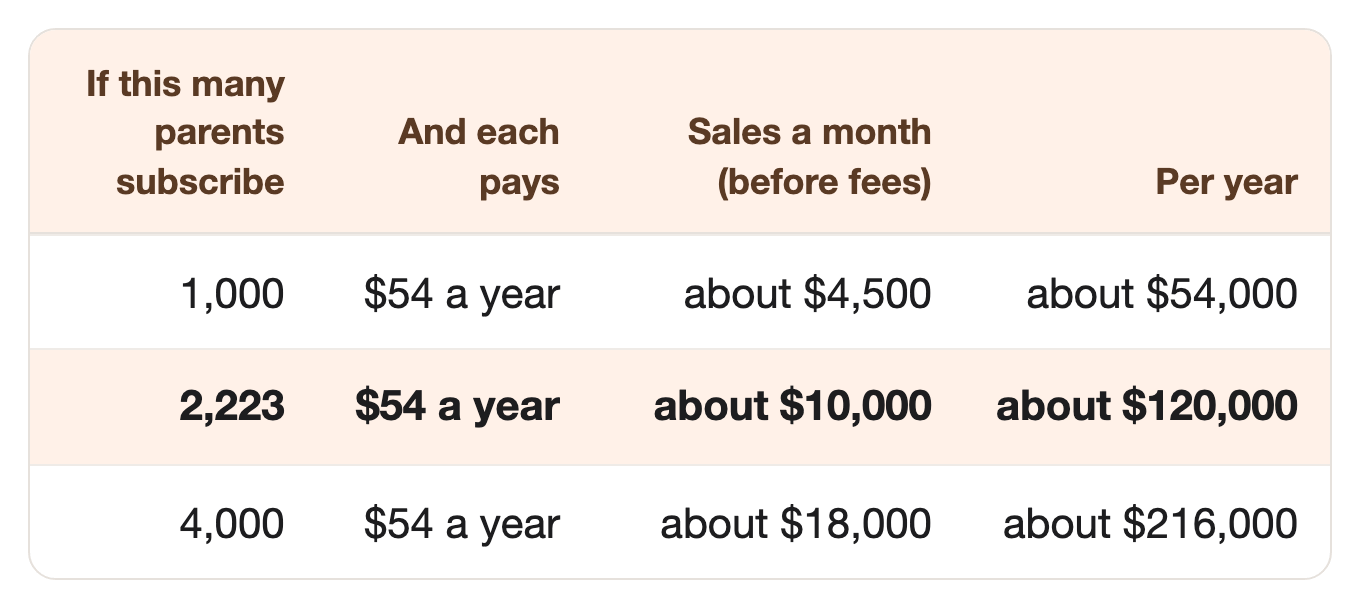
$54 a year is Tiimo’s yearly price in its iPhone app.
⠀2,223 subscribers is under 5% of Tiimo’s 50,000 paying subscribers.
⠀And if it doesn’t work? Here’s all you lose:
$99 for one year of Apple’s developer program, so you can list the app.
One month’s subscription to an AI app, like ChatGPT or Claude.
One week of your time.
⠀
👉 One idea can cover your bills, and a few ideas together could reach a million in 2 to 3 years.
Thinking “why not me?”
Good question. The answer is right below. 👇
If this one’s not for you, see you next week.
That’s it, my fellow contrarians! 🙌
Yours ‘proving you don’t need an original idea, just a proven one’ Vijay Peduru 🦸♂️
⠀
⠀
⠀
🧰 Want to build it? Here’s everything else.
In every step, AI does most of the work, while you pick a group of parents, and parents with ADHD test it with you. 🎙️
⠀
Step 1: 🎯 Pick one group of parents
One kind of family day, not every family.
Pick one group of parents with ADHD.
Parents of kids under 10, with school runs and bedtimes.
Single parents who do every drop-off alone.
Parents who work shifts, so no two days look the same.
Find where those parents already ask for help. YouTube channels, ADHD parenting podcasts, and school parent groups.
Pick a name that’s yours, and never use another app’s name or logo.
⠀
Step 2: 📚 Build the routines with real parents
The routines are the real product: the steps of a family’s morning, after-school, and bedtime, with times and pictures.
Find five parents with ADHD who will test with you.
Pay them, or give them a free year.
Your AI drafts the routine library in Part 2 of the prompt, for the parents to check.
Morning, after-school, dinner, and bedtime.
Each step gets a picture, a time, and a kid it belongs to.
A short “running late” version of every routine.
Keep the words kind. No “lazy,” no “failed,” no red alarms.
A rushed morning is hard enough.
⠀
Step 3: 🛠️ Build the app
You don’t need to code. AI coding tools build it, and an AI model breaks tasks into steps.
Keep it tiny: three screens.
Day view: the family’s day as picture blocks, with a timer on the one that’s running.
Routine: one step at a time, big picture, countdown, “Done” button.
Family: each kid’s first name, school times, activities, and usual snags.
Use an AI coding tool, like Claude Code or Cursor, and describe each screen in plain words.
When a parent taps “Break it down,” the task goes to an AI model with the family’s saved details.
This AI model isn’t the coding tool. The coding tool builds the app once, and the app talks to the model every day.
⠀
Step 4: 🔍 Check every plan
Parents rely on the app when they’re rushed, so every answer gets checked before they see it.
Your AI writes the step-breaker rules in Part 4 of the prompt, and tests them in Part 5.
These are the instructions your app sends to the AI model each time a parent taps “Break it down.”
🛡️ The rules, built into the app:
An organizing tool, not treatment. Never medical advice, and never anything about medicine.
No shaming words about the parent or the kids.
Kids’ first names and times only. Data is never sold.
Never promise a calmer family or a result.
🔍 Test 10 made-up days, including a sick kid, a late bus, and a messy request, and check what the app says.
Ask your five test parents to try it for a week before launch.
⠀
👉 The prompt already follows these rules: organizing only, no medical advice, kind words, kids’ first names only, and no promised results.
⠀
Step 5: 🏪 Open for subscribers
Copy a price parents already pay.
Free to download, with the Day view and one routine free.
New parents also get a free trial of the full app, so they can try every routine before they pay.
$54 a year or $12 a month, like Tiimo.
Easy one: no need to guess a price.
Let AI write your App Store listing, in the words parents use, like “ADHD mom morning routine.”
Put the safety line in the listing too: an organizing tool, not treatment.
⠀
Step 6: 📣 Get your first parents
Show the app where parents already look, make it easy to share, and win back the ones who stop using it.
Show the free Day view where your group already looks for help.
That means the YouTube channels, ADHD parenting podcasts, and school parent groups you found in Step 1, with a link to download it free.
Email the parents who stopped opening the app.
Remind them of the parent they set out to be: “You’re still the parent who wanted mornings the kids could see.”
Add one button that agrees, “That’s still me,” and put any offer at the bottom.
Show a share card after the first on-time week.
When the morning routine is marked done on time five school days in a row, show a card: “Five on-time mornings! 🎒”
Add a share button, and your app’s name on the card.
Swap a longer trial for an honest review.
An app with no reviews looks untested, and parents trust other parents’ words more than yours.
Three days before the free trial ends, offer two more free weeks for an honest App Store review.
Ask for honest, never for five stars.
⠀
Step 7: 🏃 Eliminate competitors
Here’s how to stay ahead when the competitors show up.
Pass the stranger test.
Show your store page to a parent who has never heard of you.
Ask who it’s for, what it fixes, and why it beats a personal planner.
Narrow the words until they can answer all three: a parent with ADHD, the school run, and the whole family’s day.
Have a switching page ready.
Write “Switching from a personal planner” before you need it.
The day a big planner raises its price, parents find a page that moves their routines over in five minutes.
⠀
Step 8: 🎲 Make it bigger
Add more groups of parents, then more apps, reusing what you built.
Add a second group of parents to the same app, like shift workers or single parents.
Then open a second app for another group whose day is hard to see, like parents of autistic kids.
Each new app reuses the code, the screens, and the step-breaker rules from your first one. 🎯
⠀
🗓️ Your first week
Phew. That was a lot. 😅
A first version of Steps 1 to 7 fits into seven days. 🚀
By day 7, you have one group of parents, a routine library, and a test app.
You also have a store listing, a win-back email, a share card, a review ask, and a switching page.
Quick heads-up:
The prompt below has eight Parts, Part 0 to Part 7, and they’re not the same as the Steps above.
Day 1 (Step 1): Run Part 0 and Part 1 of the prompt (it’s below), and pick your group of parents.
Day 2 (Step 2): Draft the routine library with Part 2, and send it to your test parents.
Day 3 (Step 3): Plan the app’s three screens with Part 3.
Days 4–5 (Step 4): Write the step-breaker rules with Part 4, then test 10 made-up days with Part 5.
Day 6 (Step 5): Write your App Store listing and Pro page (the page that shows what the paid version adds) with Part 6.
Day 7 (Steps 6 and 7): Write your win-back email, share card, review ask, and switching page with Part 7.
⠀
🏄 How to use the prompt
One prompt does all the AI work, in seven parts, plus a quick market check (Part 0).
Part 1 — Pick the group of parents. Compares three groups of parents with ADHD and picks one, with the reasons.
Part 2 — Draft the routine library. Writes the morning, after-school, dinner, and bedtime routines, each with steps, times, pictures, and a running-late version, for your test parents to check.
Part 3 — Plan the app. Writes the three screens and the safety line, ready for an AI coding tool.
Part 4 — Write the step-breaker rules. Tells the AI model how to break a task into small steps using the family’s saved details, and what it must never say.
Part 5 — Test 10 days. Writes 10 made-up days of requests, runs the rules on them, then checks the results as a strict reviewer and as a rushed parent.
Part 6 — Write the store listing and Pro page. Your App Store page and what the subscription adds, with the safety line.
Part 7 — Write the growth pieces. Your win-back email, your share card, your review ask with the trial offer, and your switching page.
Run it your way:
Part by part (the default): it pauses after each part, and you type “next” to go on.
All at once: say “run all eight parts.”
Just one part: say “only do Part 3,” or any part you need.
The full prompt is just below, under “📋 The prompt.”
🎙️ Talk to your AI sidekick, don’t type.
Turn on voice mode, or use a dictation app like Wispr Flow.
Say it messy. The AI sorts it out.
Turn it into a skill, so you never paste it again.
A skill is a saved prompt your AI keeps, so you start it with one short command instead of pasting the whole thing.
Paste the prompt into Claude or ChatGPT, and say: “Turn this into a skill I can save.”
Install once, use forever.
⠀
📋 The prompt
The prompt (copy it into Claude or ChatGPT, fill in the INPUTS part, and run it your way)
CONTEXT:
- You're my partner in building a small planner app for one group of parents with ADHD. The app shows the family's whole day as picture blocks with timers (school run, meals, kids' activities, bedtime), runs routines one step at a time, and uses an AI model to break a task into small steps with the family's saved details.
- This prompt has eight parts, Part 0 to Part 7, in order.
- Run it the way I ask:
    - If I say nothing, go one part at a time. After each part, show me the result, then stop and wait. Move on only when I type "next."
    - If I say "run all eight parts," do Part 0 to Part 7 without stopping.
    - If I say "only do Part 3" (or any part), do just that part.
- If a part needs something from me, ask for it before you start that part.
- RULES. Follow these in every part, and build them into everything you write:
    1. This is an organizing tool, not treatment. Never give medical advice, never diagnose, and never mention medicine or doses.
    2. Never use shaming words about the parent or the kids, like "lazy," "failed," or "bad mom." Keep every line kind and plain.
    3. Store only kids' first names, ages, and times. Never ask for health details, and never sell or share any data.
    4. Never promise a calmer family, a result, or a date.
    5. Never copy another app's words, pictures, or routines. Write everything in my own words.
- Never invent a fact or a number. If you're not sure a fact is right, leave it out and tell me.
- Keep web search on for the whole prompt (turn on search in ChatGPT or Claude), so you can open any page you need to check.

=============== INPUTS — edit these, or just run as is ===============

Groups of parents I'm thinking about (or leave blank):
{e.g. parents of kids under 10, single parents, parents who work shifts}

What I know about it:
{e.g. I have ADHD, two kids, and our mornings fall apart at 7:45}

My test parents (or leave blank):
{e.g. five parents with ADHD from my kids' school who said they'd try it}

My prices:
{e.g. free Day view and one routine; $54 a year or $12 a month}

======================== END OF INPUTS ========================

THE PARTS:

Part 0 — Check the market.
This part needs web search (turn on search in ChatGPT or Claude). For each group of parents I listed, search and give the count, the three biggest with links, and their prices:
1. Visual planner and family routine apps on the App Store and Google Play.
2. Online courses, memberships, and printable planners for parents with ADHD.
3. The biggest YouTube channels for parents with ADHD.
Then tell me: early (few apps), growing, or crowded, and which group of parents looks least served. Give a link for every number. If you can't open a page, say so. Never guess a number.

Part 1 — Pick the group of parents.
Compare three groups of parents with ADHD, using Part 0 and what I know. For each: what their hardest part of the day is, where they ask for help, and how well the apps in Part 0 cover them. Then pick one, and say why. Say clearly which reasons are your guess.

Part 2 — Draft the routine library.
Draft four routines for my group, for my test parents to check: morning, after-school, dinner, and bedtime.
1. Each routine has 5 to 10 steps. Each step has a short name, a picture idea (an emoji or a simple icon), a time in minutes, and who it belongs to (parent, a kid, or everyone).
2. Each routine has a "running late" version with only the must-do steps.
3. Add a list of five things that often go wrong in that routine, and one small fix for each.
Mark it "DRAFT: to be checked by parents with ADHD." Follow every rule in RULES.

Part 3 — Plan the app.
Write a plan I can paste into an AI coding tool, like Claude Code or Cursor. Keep it to three screens:
1. Day view: the family's day as colored picture blocks, with a countdown on the block that's running and a "Leave in 5 minutes" alert.
2. Routine: one step at a time, with a big picture, a countdown, and a "Done" button a child can tap.
3. Family: each kid's first name, age, school times, activities, and the usual snags.
Add a "Break it down" button on any block, which sends the task and the Family details to an AI model.
Add a free tier (Day view and one routine) and a paid tier at my price (all routines and "Break it down"). Add a line on the settings screen and in the app's About page: "An organizing tool, not treatment or medical advice." Say what data the app stores, and that it's never sold.

Part 4 — Write the step-breaker rules.
Write the instructions the app sends to the AI model with each "Break it down" request and the family's saved details. They must say:
1. Break the task into 3 to 8 small steps, each with a time in minutes and a picture idea.
2. Use the family's details (names, times, snags), and fit the steps before the next block on the day.
3. If the time left is too short, give the "running late" version and say what can wait.
4. Never give medical advice, never mention medicine, and never use shaming words.
Give the answer back in a fixed format the app can read.

Part 5 — Test 10 days.
1. Write 10 made-up requests from my group: easy days, a sick kid, a late bus, a forgotten permission slip, and a messy voice note.
2. Run the Part 4 rules on each request, and show what the app would say.
3. Now act as a strict reviewer. Flag any answer that sounds like medical advice, shames anyone, asks for health details, or doesn't fit the time left.
4. Then act as a rushed parent at 7:40 a.m. Flag anything too long, confusing, or stressful.
5. List what to change in the Part 4 rules or the Part 2 routines.

Part 6 — Write the store listing and Pro page.
Write my App Store and Google Play listing: a title that names the job, a subtitle, a short description, and keywords, using the words parents actually search for, like "ADHD mom morning routine." Then write a short page on what the paid tier adds, the price, and "Cancel any time." Include, word for word: "An organizing tool, not treatment or medical advice." Never promise a result.

Part 7 — Write the growth pieces.
Write four things:
1. A win-back email to parents who stopped opening the app: a line about who they are at their best (like "You're still the parent who wanted mornings the kids could see"), one "That's still me" button, and any offer at the bottom. Kind words only; never shame them for drifting off.
2. A share card for the first on-time week (five school mornings out the door on time): a short line, my app's name, and no promise of results.
3. An in-app message shown three days before the free trial ends: two more free weeks in exchange for an honest App Store review. Ask for honest, never for five stars.
4. A "Switching from a personal planner" page: what my app does for a family that a one-person planner doesn't, and steps to rebuild their routines in five minutes. Never name or insult another app.
Never promise results, and never invent a number.
⠀
📎 The sources
Every number above, with where it came from.
Tiimo’s start · Number: Master’s thesis by Helene Lassen Nørlem and Melissa Azari (Digital Design and Communication, IT University of Copenhagen) on a digital tool for children with ADHD; handed in September 2014; families “ret hooked” (pretty hooked); both took full-time jobs and worked on Tiimo in the evenings; smartwatch app that counts down to the next activity; a parent often gets “rollen som den, der skælder ud” (the role of the one who scolds); one test family got “en gladere datter og en mere harmonisk familie” (a happier daughter and a calmer family) · Source: IT University of Copenhagen, August 23, 2016 (Danish; our translation)
Founding and Melissa · Number: “founded the company in 2015”; “Melissa Würtz Azari, who herself has ADHD” · Source: The Next Web, August 28, 2024
2020 goal · Number: A crowdfunding campaign on Seedrs, “overfunded by 107%”; “hopes to increase its subscriber base to 10,000” · Source: Disability Insider, February 6, 2020
Tiimo subscribers · Number: “over 50k paying subscribers as of August 2024, with more than 3 out of 4 of these identifying as neurodivergent”; “surpassing 500K free users worldwide” · Source: Tiimo, August 27, 2024
App of the Year · Number: “iPhone App of the Year: Tiimo” · Source: Apple Newsroom, December 4, 2025
Tiimo’s price and first day · Number: “Subscription plans cost $12/month ($144/year) or $54/year ($4.50/month)”; Tiimo prefilled “coffee in the morning, start work, have dinner, or to watch TV” · Source: Daring Fireball, December 5, 2025
Rough yearly sales · Number: 50,000 × $54 = $2.7 million a year (our math from the two rows above, not Tiimo’s number) · Source: Tiimo, August 27, 2024; Daring Fireball, December 5, 2025
US adults with ADHD · Number: “In 2023, an estimated 15.5 million U.S. adults had an ADHD diagnosis”; “More than one half of adults with ADHD (55.9%) received their diagnosis during adulthood” · Source: CDC, MMWR, October 10, 2024
OurFamilyWizard and Cozi · Number: OurFamilyWizard, “the leading co-parenting app for families living separately,” “Founded in 2001,” acquired Cozi; “With more than 20 million registered users, Cozi helps busy families” · Source: PR Newswire, May 4, 2022
ADDitude · Number: “Ellen Kingsley launched ADDitude in 1998”; she “left her 20-year TV journalism career when her son was diagnosed with severe ADHD” · Source: ADDitude, February 7, 2023 (updated May 12, 2025)
Parent comments · Number: “running late to drop my kids off at daycare…” (January 8, 2026, Understood video); “This season of life is so very hard…” (September 20, 2023, Life in the Mundane video); “The REAL challenge is when you have multiple kids with ADHD…” (November 8, 2023, Hayley Honeyman video) · Source: Comment 1; Comment 2; Comment 3
Apple developer fee · Number: “$99 annual membership” · Source: Apple Developer Program; Wayback copy, June 1, 2026
$10K math · Number: $54 × 2,223 = $120,042 a year, about $10,000 a month; 2,223 is about 4.4% of 50,000 · Source: Our math, from Tiimo’s price